Showing posts with label JavaScript. Show all posts

Tuesday, June 10, 2014

Image Extension Validation with JavaScript in PHP

After Completing this Tutorial you will able to do validation regarding image extension. As you may be known to valid extensions which are jpg, jpeg, png, gif.

So create index.php and uploadphoto.php file and write whatever message you want to display on uploadphoto.php because we are about to consider validation part not the database part.

index.php
 <html>  
 <body bgcolor="orange">  
 <?php  
 echo "<form action='uploadphoto.php' method='post' enctype='multipart/form-data' >  
  <b>Select Image:</b> <input type='file' name='image' id='image'><br />  
  <br />  
  <input type='submit' name='Submit' value='Upload' id='button1' onClick='return img_path()'/>  
  </form>"  
 ?>  
 <br/>  
 <script type="text/javascript" language="javascript">  
 function img_path()  
 {  
 var file_path=document.getElementById('image').value;  
 if(file_path.match(".jpeg$")==".jpeg" || file_path.match(".gif$")==".gif" || file_path.match(".GIF$")==".GIF" || file_path.match(".JPEG$")==".JPEG" || file_path.match(".JPG$")==".JPG" ||file_path.match(".jpg$")==".jpg")  
 {  
 return true;  
 }  
 else  
 {  
 alert("Upload .jpg/.gif /.png file only");  
 return false;  
 }  
 }  
 </script>  
 </body>  
 </html>  

Output :
Select Image Screen
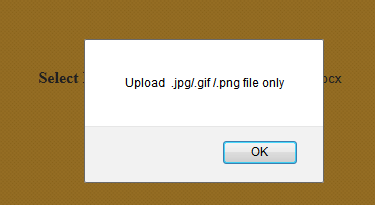
Image Extension Validation Screen

Sunday, April 28, 2013

Client side validation on Radio button,Checkbox and Dropdownlist using JavaScript with JSP

In this Tutorial we are performing client side validation using JavaScript with JSP page. and In this post you can learn that how to perform client side validation on Radio buttons,Check-boxes  and on Select tag(Dorpdownlist).

Project Structure in Project Explorer:
 Also read for details of How to create first JSP project


stuform.jsp
create a user input page.
Make sure for script tag for check.js
<script type="text/javascript" src="check.js"></script>
between <head></head> tag
 <%@ page language="java" contentType="text/html; charset=ISO-8859-1"  
   pageEncoding="ISO-8859-1"%>  
 <!DOCTYPE html PUBLIC "-//W3C//DTD HTML 4.01 Transitional//EN" "http://www.w3.org/TR/html4/loose.dtd">  
 <html>  
 <head>  
 <meta http-equiv="Content-Type" content="text/html; charset=ISO-8859-1">  
 <title>Register</title>  
 <script type="text/javascript" src="check.js"></script>  
 </head>  
 <body bgcolor="gray">  
 <center >  
 <h1> Registration</h1>  
 <form action="success.jsp" method="post" name="myform">  
 <table bgcolor="lightblue">  
 <tr>  
 <td>Name:</td>  
 <td><input type="text" name="name" id="user"/></td>  
 <td><label id="label1"></label></td>  
 </tr>  
 <tr>  
 <td>Country</td>  
 <td><select id="country" name="country">  
       <option value="" selected>select option</option>  
       <option value="India">INDIA</option>  
       <option value="USA">USA</option>  
       <option value="China">CHINA</option>  
 </select>  
 </td>  
 <td><label id="label2"></label></td>  
 </tr>  
 <tr>  
 <td>Gender</td>  
 <td ><input type="radio" name="gender" value="m" />Male  
   <input type="radio" name="gender" value="f" />Female  
 </td>  
 <td><label id="label3"></label></td>  
 </tr>  
 <tr>  
 <td>Fruit</td>  
 <td><input type="checkbox" name="fruit" value="orange" />Orange  
   <input type="checkbox" name="fruit" value="banana" />Banana  
   <input type="checkbox" name="fruit" value="apple" />Apple  
 </td>  
 <td><label id="label4"></label></td>  
 </tr>  
 <tr>  
 <td><input type="submit" value="Submit" onclick="return validate();"></td>  
 </tr></table>  
 </form>  
 </center></body>  
 </html>  


check.js
write javascript on check.js for validate stuform.jsp and we are performing validation on submit button click.
 f1=1,f2=1,f3=1,f4=1;  
 function validate()  
 {  
   var user=document.getElementById("user").value;  
   var element=document.getElementById("label1");  
    if(user=="")  
     {  
     element.innerHTML="Username Required!";  
     element.style.color="red";  
     f1=1;  
    }  
    else  
     {  
       if(user.search(/^([A-Za-z]){4,15}$/)==-1)  
       {  element.innerHTML="Not a valid User Name.It must be 4-15 characters long";  
         element.style.color="red";  
         f1=1;  
        }  
     else {  
       element.innerHTML="Correct";  
       element.style.color="green";  
        f1=0;  
       }  
     }  
      var con=document.getElementById("country").value;  
      var element=document.getElementById("label2");  
      if(con=="")  
        {  
        element.innerHTML="Country Required!";  
        element.style.color="red";  
        f2=1;  
       }  
       else  
        { element.innerHTML="Correct";  
          element.style.color="green";  
          f2=0;  
        }  
      var gender = document.myform.gender;  
      var element=document.getElementById("label3");  
   for (var i=0; i<gender.length; i++)  
   {  
    if (gender[i].checked)  
         {  
         element.innerHTML="Correct";  
      element.style.color="green";  
         f3=0;  
      break;  
      }  
    else  
         {  
         element.innerHTML="Gender Required!";  
          element.style.color="red";  
         }  
    }  
   var fruit = document.myform.fruit;  
      var element=document.getElementById("label4");  
   for (var i=0; i<fruit.length; i++)  
   {  
    if (fruit[i].checked)  
         {  
         element.innerHTML="Correct";  
      element.style.color="green";  
         f4=0;  
      break;  
      }  
    else  
         {  
         element.innerHTML="Fruit(s) Required!";  
         element.style.color="red";  
          f4=1;  
         }  
    }  
   if(f1==1||f2==1||f3==1||f4==1)  
     {  
       alert("Complete TextBox Conditions!!");  
       return false;  
     }  
     else  
       {  
         return true;  
       }  
 }  

success.jsp
create a user's success page.
 <%@ page language="java" contentType="text/html; charset=ISO-8859-1"  
   pageEncoding="ISO-8859-1"%>  
 <!DOCTYPE html PUBLIC "-//W3C//DTD HTML 4.01 Transitional//EN" "http://www.w3.org/TR/html4/loose.dtd">  
 <html>  
 <head>  
 <meta http-equiv="Content-Type" content="text/html; charset=ISO-8859-1">  
 <title>success</title>  
 </head>  
 <body bgcolor="lightblue">  
 <center><h3>  
 Successfully Registered. </h3></center>  
 </body>  
 </html>  

Download Code

View in Browser: 
checking validation:
 success page: 

Tuesday, April 16, 2013

Validation for Email and Confirm Password using JavaScript, Regular Expression on JSP page

In this Tutorial we are performing validation on textbox for email and re-type password using Regular Expression with JavaScript. We are performing our task with Eclipse IDE and for user's view we are using JSP.

Project Explorer View:


register.jsp
If we want to write JavaScript on same html page then it must be inside <head> </head> tag.
for green tick mark we are using green.jpg image which you can see in project explorer view.
If all available text-box conditions are true then on submit button click page will redirect to success.jsp
 <%@ page language="java" contentType="text/html; charset=ISO-8859-1"  
      pageEncoding="ISO-8859-1"%>  
 <!DOCTYPE html PUBLIC "-//W3C//DTD HTML 4.01 Transitional//EN" "http://www.w3.org/TR/html4/loose.dtd">  
 <html>  
 <head>  
 <meta http-equiv="Content-Type" content="text/html; charset=ISO-8859-1">  
 <title>User Registration page</title>  
 <script type="text/javascript">  
 f1=1,f2=1,f22=1;  
 function checkemail()  
 {  
   var email=document.getElementById("email").value;  
   var element=document.getElementById("label1");  
   if(email=="")  
     { element.innerHTML="Email Id Required!";  
     element.style.color="red";  
     document.getElementById("img1").style.visibility='hidden';  
     document.getElementById("label1").style.visibility='visible';  
     f1=1;  
     }  
   else  
     {  if(email.search(/^\w+([.-]\w+)*@([A-Za-z0-9\-]){2,12}\.([A-Za-z]{2,4})$/)==-1)  
       {  element.innerHTML="Not a valid email format. Must be email@host.domain";  
         element.style.color="red";  
         document.getElementById("img1").style.visibility='hidden';  
         document.getElementById("label1").style.visibility='visible';  
         f1=1;  
        }  
     else{  
          document.getElementById("img1").style.visibility='visible';  
          document.getElementById("label1").style.visibility='hidden';  
       f1=0;  
       }  
      }  
 }  
 function checkpass1()  
 {  
   var pass1=document.getElementById("pass1").value;  
   var pass2=document.getElementById("pass2").value;  
   var element=document.getElementById("label2");  
   if(pass1=="")  
     {element.innerHTML="Password Required!";  
     element.style.color="red";  
     document.getElementById("img2").style.visibility='hidden';  
     document.getElementById("label2").style.visibility='visible';  
     f2=1;  
   }  
   else  
   {   
     if(pass1.length<4||pass1.length>15)  
     {  
       element.innerHTML="Password must be 4-15 characters long";  
       element.style.color="red";  
       document.getElementById("img2").style.visibility='hidden';  
       document.getElementById("label2").style.visibility='visible';  
       f2=1;  
     }  
     else  
     {document.getElementById("img2").style.visibility='visible';  
        document.getElementById("label2").style.visibility='hidden';  
       f2=0;  
     }  
   }  
   if(pass2=="")  
   {//no f2 set  
        document.getElementById("img2").style.visibility='hidden';  
     document.getElementById("label2").style.visibility='visible';  
   }  
   else if(pass1!=pass2)  
   { element.innerHTML="Password Not Matched!";  
        element.style.color="red";  
        document.getElementById("img2").style.visibility='hidden';  
        document.getElementById("label2").style.visibility='visible';  
        f2=1;  
   }  
   else  
   {document.getElementById("img2").style.visibility='visible';  
      document.getElementById("label2").style.visibility='hidden';  
       f2=0;  
   }  
 }  
 function checkpass2()  
 {  
   var pass1=document.getElementById("pass1").value;  
   var pass2=document.getElementById("pass2").value;  
   var element=document.getElementById("label2");  
   if(pass1==""&&pass2=="")  
   { element.innerHTML="Password Required!";  
     element.style.color="red";  
     document.getElementById("img2").style.visibility='hidden';  
     document.getElementById("label2").style.visibility='visible';  
     f22=1;  
   }  
   else if(pass2.length<4||pass2.length>15)  
   {  
       element.innerHTML="Password must be 4-15 characters long";  
       element.style.color="red";  
       document.getElementById("img2").style.visibility='hidden';  
       document.getElementById("label2").style.visibility='visible';  
       f22=1;  
   }  
   else if(pass1!=pass2)  
   { element.innerHTML="Password Not Matched!";  
     element.style.color="red";  
     document.getElementById("img2").style.visibility='hidden';  
     document.getElementById("label2").style.visibility='visible';  
     f22=1;  
   }  
   else  
   {document.getElementById("img2").style.visibility='visible';  
      document.getElementById("label2").style.visibility='hidden';  
     f22=0;  
   }  
 }  
 function validate()  
 {  
   if(f1==1||f2==1||f22==1)  
     {  
       alert("Complete TextBox Conditions!!");  
       return false;  
     }  
     else  
       {  
         return true;  
       }  
 }  
 </script>  
 </head >  
 <body bgcolor="black">  
 <form action="success.jsp" method="post">  
           <table bgcolor="white" align="center">  
             <tr>  
                     <td colspan="3"><h1>User Registration</h1></td>  
                </tr>  
                <tr>  
                     <td>Email:</td>  
                     <td><input type="text" id="email" onblur="checkemail();"></td>  
                     <td><img src="green.jpg" id="img1" style="visibility:hidden"><label id="label1"></label></td>  
                </tr>  
                <tr>  
                     <td>Password:</td>  
                     <td><input type="password" id="pass1" onblur="checkpass1();" /></td>  
                </tr>  
                <tr>  
                     <td>Confirm Password:</td>  
                     <td><input type="password" id="pass2" onblur="checkpass2();"/></td>  
                     <td><img src="green.jpg" id="img2" style="visibility:hidden"><label id="label2"></label></td>  
                </tr>  
                <tr>  
                     <td><input type="submit" value="Register" onclick="return validate();"/></td>  
                </tr>  
           </table>  
 </form>  
 </body>  
 </html>  

success.jsp
 <%@ page language="java" contentType="text/html; charset=ISO-8859-1"  
   pageEncoding="ISO-8859-1"%>  
 <!DOCTYPE html PUBLIC "-//W3C//DTD HTML 4.01 Transitional//EN" "http://www.w3.org/TR/html4/loose.dtd">  
 <html>  
 <head>  
 <meta http-equiv="Content-Type" content="text/html; charset=ISO-8859-1">  
 <title>success</title>  
 </head>  
 <body bgcolor="lightblue">  
 <center><h3>  
 Your record registered successfully.</h3></center>  
 </body>  
 </html>  


View in Browser:

Friday, December 7, 2012

Validation on TextField using JavaScript and Print command using servlet on NetBeans


Here in this Tutorial we are using JavaScript with Regular Expreesion to perform validation on TextField and Invoking Print a page command on Servlet using netbeans.

Project View on Project Explorer on Completion of This Tutorial
index.jsp
In index.jsp page in form tag printing is url pattern of printing.java page which we are passing in Action property which redirects index.jsp to printing.java
 <%@page contentType="text/html" pageEncoding="UTF-8"%>  
 <!DOCTYPE HTML PUBLIC "-//W3C//DTD HTML 4.01 Transitional//EN"  
   "http://www.w3.org/TR/html4/loose.dtd">  
 <html>  
   <head>  
     <meta http-equiv="Content-Type" content="text/html; charset=UTF-8">  
     <title>Registration Page</title>  
     <script type="text/javascript">  
       f1=1,f2=1;  
       function checkfname()  
       {  
         var fname=document.getElementById("fname").value;  
         var element=document.getElementById("label1");  
          if(fname=="")  
           {element.innerHTML="First Name Required!";  
           element.style.color="red";  
           f1=1;  
         }  
         else if(fname.length<4||fname.length>10)  
           { element.innerHTML="First Name must be 4-10 characters long";  
           element.style.color="red";  
           f1=1;  
         }  
         else  
           {  
             if(fname.search(/^([A-Za-z]){1,}$/)==-1)  
             {  element.innerHTML="Not a valid First Name";  
               element.style.color="red";  
               f1=1;  
              }  
           else {  
             element.innerHTML="Correct";  
             element.style.color="green";  
             f1=0;  
             }  
           }  
       }  
       function checklname()  
       {  
         var lname=document.getElementById("lname").value;  
         var element=document.getElementById("label2");  
          if(lname=="")  
           {element.innerHTML="Last Name Required!";  
           element.style.color="red";  
           f2=1;  
         }  
         else if(lname.length<4||lname.length>10)  
           { element.innerHTML="Last Name must be 4-10 characters long";  
           element.style.color="red";  
           f2=1;  
         }  
         else  
           {  
             if(lname.search(/^([A-Za-z]){1,}$/)==-1)  
             {  element.innerHTML="Not a valid Last Name";  
               element.style.color="red";  
               f2=1;  
              }  
           else {  
             element.innerHTML="Correct";  
             element.style.color="green";  
             f2=0;  
             }  
           }  
       }  
       function validate()  
       {  
         if(f1==1||f2==1)  
           {  
             alert("Entry not valid!!");  
             return false;  
           }  
           else  
             {  
               return true;  
             }  
       }  
     </script>  
   </head>  
   <body>  
     <h1>Registration</h1>  
     <form action="printing">  
     <table><tr><td>First Name:<input type="text" id="fname" name="t1" onblur="checkfname();"></td><td><label id="label1"/></td></tr>  
     <tr><td>Last Name:<input type="text" id="lname" name="t2" onblur="checklname();"></td><td><label id="label2"/></td></tr>  
     <tr><td><input type="submit" value="submit" onclick="return validate();" ></td></tr></table>  
     </form>  
   </body>  
 </html>  

printing.java
Here we are using window.print() command on print button click to print output page.
 import java.io.*;  
 import javax.servlet.ServletException;  
 import javax.servlet.http.*;  
 public class printing extends HttpServlet {  
   protected void doGet(HttpServletRequest request, HttpServletResponse response)  
   throws ServletException, IOException {  
     response.setContentType("text/html;charset=UTF-8");  
     PrintWriter out = response.getWriter();  
     String s1=request.getParameter("t1");  
     String s2=request.getParameter("t2");  
     try {  
       out.println("First Name:"+s1+"<br>");  
       out.println("Last Name:"+s2+"<br>");  
       out.println("<input type=submit value=print onclick=window.print()>");  
     } finally {   
       out.close();  
     }  
   }   
  }  


web.xml
 <?xml version="1.0" encoding="UTF-8"?>  
 <web-app version="2.5" xmlns="http://java.sun.com/xml/ns/javaee" xmlns:xsi="http://www.w3.org/2001/XMLSchema-instance" xsi:schemaLocation="http://java.sun.com/xml/ns/javaee http://java.sun.com/xml/ns/javaee/web-app_2_5.xsd">  
   <servlet>  
     <servlet-name>printing</servlet-name>  
     <servlet-class>printing</servlet-class>  
   </servlet>  
   <servlet-mapping>  
     <servlet-name>printing</servlet-name>  
     <url-pattern>/printing</url-pattern>  
   </servlet-mapping>  
   <session-config>  
     <session-timeout>  
       30  
     </session-timeout>  
   </session-config>  
   <welcome-file-list>  
     <welcome-file>index.jsp</welcome-file>  
   </welcome-file-list>  
 </web-app>  

Download Code Link 1
Download Code Link 2
output:


Popular Posts