Showing posts with label Struts2. Show all posts

Saturday, December 28, 2013

How to upload Multiple Files- Images (blob data) with enctype="multipart/form-data" in Oracle Database using Struts2, JDBC and Eclipse IDE

In this tutorial we are working with multiple images (blob data type) uploading with other two values as file id and name (these two values are not entered by user as input in database table). And every time we are replacing new values with previous stored values(here we are working with three user inputs as browse button or uploader).

 
Here we are using enctype="multipart/form-data", Struts2 jars and tags, Apache Tomcat 7.0 and Java 6 (but you can use them as other versions too, available on your system).
you can also Download full code with required Jars. 
Download Full Code with Jars 

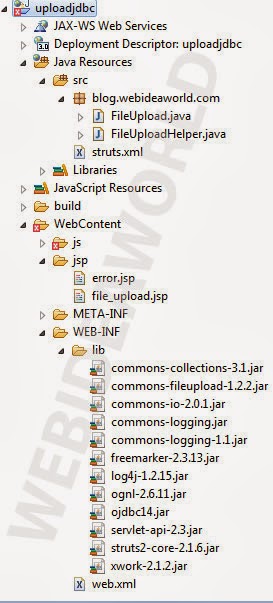
Project View in Project Explorer
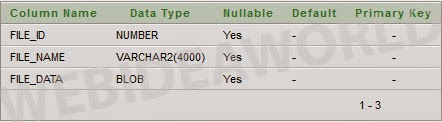
Create a table with name FILES and here we are using TEST Schema(but you can use others too for example HR Schema)
FILES Table

file_upload.jsp
This is page for user's input as well as output.
 <%@ page language="java" contentType="text/html; charset=ISO-8859-1"  
   pageEncoding="ISO-8859-1"%>  
 <%@ taglib uri="/struts-tags" prefix="s"%>  
 <!DOCTYPE html PUBLIC "-//W3C//DTD HTML 4.01 Transitional//EN" "http://www.w3.org/TR/html4/loose.dtd">  
 <html>  
 <head>  
 <meta http-equiv="Content-Type" content="text/html; charset=ISO-8859-1">  
 <script type="text/javascript" src="js/jquery-1.7.2.js"></script>  
 <script type="text/javascript" src="js/jquery-1.7.2.min.js"></script>  
 <title>FILE UPLOAD</title>  
 </head>  
 <body bgcolor="green">  
 <s:form id="uploadjdbc" name="uploadjdbc" theme="simple" method="POST" enctype="multipart/form-data">  
      <table width="75%" align="center" border="1">  
           <tr>  
                <td width="33%" colspan="2" align="center" ><img src="<s:url action='getimage?id=image_1' />" id="imgLogin_1" name="imgLogin_1" width="400" /></td>  
                <td width="34%" colspan="2" align="center" ><img src="<s:url action='getimage?id=image_2' />" id="imgLogin_2" name="imgLogin_2" width="400" /></td>  
                <td width="33%" colspan="2" align="center" ><img src="<s:url action='getimage?id=image_3' />" id="imgLogin_3" name="imgLogin_3" width="400" /></td>  
           </tr>  
           <tr><td colspan="6">&nbsp;</td></tr>  
           <tr>  
                <td align="right" width="30%">  
                     Select File :&nbsp;  
                </td>  
                <td>  
                     <s:file id="upload_1" name="upload_1" label="File" onblur="javascript: validateFileName();" />  
                </td>  
                <td align="right" width="30%">  
                     Select File :&nbsp;  
                </td>  
                <td>  
                     <s:file id="upload_2" name="upload_2" label="File" onblur="javascript: validateFileName();" />  
                </td>  
                <td align="right" width="30%">  
                     Select File :&nbsp;  
                </td>  
                <td>  
                     <s:file id="upload_3" name="upload_3" label="File" onblur="javascript: validateFileName();" />  
                </td>  
           </tr>  
           <tr><td colspan="6">&nbsp;</td></tr>  
           <tr>  
                <td colspan="6" align="center">  
                     <input type="button" id="btnUpload" value="Upload">&nbsp;&nbsp;  
                     <input type="reset" id="btnReset" value="Reset">  
                </td>  
           </tr>  
      </table>  
 </s:form>  
 </body>  
 <script type="text/javascript">  
      $.getScript('js/file_upload.js');  
 </script>  
 </html>  

struts.xml
This file contains information about which action class need to be invoked.
 <!DOCTYPE struts PUBLIC "-//Apache Software Foundation//DTD Struts Configuration 2.0//EN" "http://struts.apache.org/dtds/struts-2.0.dtd">  
 <struts>  
      <constant name="struts.enable.DynamicMethodInvocation" value="false" />  
      <constant name="struts.devMode" value="false" />  
      <constant name="struts.custom.i18n.resources" value="ApplicationResources" />  
      <constant name="struts.ui.templateDir" value="template" />  
      <constant name="struts.multipart.maxSize" value="5242880" />  
      <package name="uploadjdbc" extends="struts-default">  
           <action name="upload" class="blog.webideaworld.com.FileUpload">  
                <result name="success">jsp/file_upload.jsp</result>  
                <result name="input">jsp/error.jsp</result>  
                <result name="error">jsp/error.jsp</result>  
           </action>  
           <action name="getimage" class="blog.webideaworld.com.FileUpload" method="invoke" />  
      </package>  
 </struts>  

FileUpload.java
This invoke() function will be called by struts.xml for displaying already uploaded images. It writes the byte array data to the output Stream.
 package blog.webideaworld.com;  
 import javax.servlet.http.HttpServletResponse;  
 import org.apache.struts2.ServletActionContext;  
 import com.opensymphony.xwork2.ActionSupport;  
 public class FileUpload extends ActionSupport {  
      private static final long serialVersionUID = 1L;  
      private FileUploadHelper helper = new FileUploadHelper();  
      private String id = "";  
      public String execute() {  
           if (helper.saveFiles()) {  
                return SUCCESS;  
           } else {  
                return ERROR;  
           }  
      }  
       
      public void invoke() throws Exception {  
           HttpServletResponse response = ServletActionContext.getResponse();  
           response.getOutputStream().write(helper.getFiles(id));  
           response.getOutputStream().flush();  
      }  
      public String getId() {  
           return id;  
      }  
      public void setId(String id) {  
           this.id = id;  
      }  
 }  

FileUploadHelper.java
setFileMap() is setting all the files received from JSP to a map. "mapFile.get("upload_"+i)" is getting one file from map. "getFileBlob(oFile)" is reading file from the input stream. and some other required explanation is inside code.
 package blog.webideaworld.com;  
 import java.io.File;  
 import java.io.FileInputStream;  
 import java.sql.Connection;  
 import java.sql.DriverManager;  
 import java.sql.PreparedStatement;  
 import java.sql.ResultSet;  
 import java.sql.SQLException;  
 import java.sql.Statement;  
 import java.util.Enumeration;  
 import java.util.HashMap;  
 import java.util.Map;  
 import org.apache.struts2.ServletActionContext;  
 import org.apache.struts2.dispatcher.multipart.MultiPartRequestWrapper;  
 public class FileUploadHelper {  
      Map<String, File> mapFile = new HashMap<String, File>();  
      byte[] imageInByte = null;  
      public boolean saveFiles() {  
           Connection conn = null;  
           PreparedStatement pstmt = null;  
           Integer intRowsAffected = 0;  
           boolean flag = true;  
           byte[] bData = null;  
           File oFile = null;  
           try {  
                setFileMap();                    //Setting all the files received from JSP to a map  
                //Database connectivity  
                Class.forName("oracle.jdbc.OracleDriver");  
                conn = DriverManager.getConnection("jdbc:oracle:thin:@localhost:1521:xe", "test", "test");  
                for (int i = 1; i <= 3; i++) {  
                     intRowsAffected = 0;  
                     oFile = mapFile.get("upload_"+i);               //Getting one file from map  
                     if (oFile != null) {  
                          bData = getFileBlob(oFile);                    //Reading file from the input stream  
                          //If file with id (i) already exists, then it is updated  
                          pstmt = conn.prepareStatement("UPDATE FILES SET FILE_DATA=? WHERE FILE_ID=?");  
                          pstmt.setBytes(1, bData);  
                          pstmt.setInt(2, i);  
                          intRowsAffected = pstmt.executeUpdate();  
                          if (intRowsAffected == 0) {               //If file does not exists, a new entry is inserted  
                               pstmt = conn.prepareStatement("INSERT INTO FILES (FILE_ID, FILE_NAME, FILE_DATA) VALUES (?,?,?)");  
                               pstmt.setInt(1, i);  
                               pstmt.setString(2, oFile.getName());  
                               pstmt.setBytes(3, bData);  
                               intRowsAffected = pstmt.executeUpdate();  
                               if (intRowsAffected == 0) {          // If insertion fails, error page will be displayed  
                                    return false;  
                               }  
                          }  
                     }  
                }  
           } catch (Exception e) {  
                System.out.println(e);  
                flag = false;  
           } finally {  
                try {  
                     pstmt.close();  
                     conn.close();  
                } catch (SQLException e) { }  
           }  
           return flag;  
      }  
      public byte[] getFileBlob(File file) {  
           byte[] bFile = new byte[(int) file.length()];  
           try {  
                FileInputStream fileInputStream = new FileInputStream(file);  
                fileInputStream.read(bFile);  
                fileInputStream.close();  
           } catch (Exception e) {  
                e.printStackTrace();  
           }  
           return bFile;  
      }  
      private void setFileMap() {  
           MultiPartRequestWrapper mprw = (MultiPartRequestWrapper) ServletActionContext.getRequest();  
           Enumeration<String> e = mprw.getFileParameterNames();  
           while(e.hasMoreElements()) {  
                String str = e.nextElement();          //this will give the id from the JSP  
                mapFile.put(str, mprw.getFiles(str)[0]);  
           }  
      }  
      /**  
       * @param id  
       * @return byte array corresponding to the id.  
       */  
      public byte[] getFiles(String id) {  
           Connection conn = null;  
           Statement stmt = null;  
           ResultSet rs = null;  
           try {  
                Class.forName("oracle.jdbc.OracleDriver");  
                conn = DriverManager.getConnection("jdbc:oracle:thin:@localhost:1521:xe", "test", "test");  
                stmt = conn.createStatement();  
                rs = stmt.executeQuery("SELECT FILE_DATA FROM FILES WHERE FILE_ID="+Integer.parseInt(id.split("_")[1]));  
                if (rs.next()) {  
                     imageInByte = rs.getBytes(1);  
                }  
           } catch (Exception e) {  
                System.out.println(e);  
           }  
           return imageInByte;  
      }  
 }  

file_upload.js
This is for validation part.
 $('#btnUpload').click(function () {  
      if ($('#upload_1').val() == '' && $('#upload_2').val() == '' && $('#upload_3').val() == '') {  
           alert('Select atleast 1 Image !!!');  
           return false;  
      }  
      document.forms[0].action = 'upload.action';  
      document.forms[0].submit();  
 });  

web.xml
 <?xml version="1.0" encoding="UTF-8"?>  
 <web-app xmlns:xsi="http://www.w3.org/2001/XMLSchema-instance"  
      xmlns="http://java.sun.com/xml/ns/javaee" xmlns:web="http://java.sun.com/xml/ns/javaee/web-app_2_5.xsd"  
      xsi:schemaLocation="http://java.sun.com/xml/ns/javaee http://java.sun.com/xml/ns/javaee/web-app_3_0.xsd"  
      id="WebApp_ID" version="3.0">  
      <display-name>uploadjdbc</display-name>  
      <welcome-file-list>  
           <welcome-file>jsp/file_upload.jsp</welcome-file>  
      </welcome-file-list>  
      <filter>  
           <filter-name>struts2</filter-name>  
           <filter-class>org.apache.struts2.dispatcher.ng.filter.StrutsPrepareAndExecuteFilter</filter-class>  
      </filter>  
      <filter-mapping>  
           <filter-name>struts2</filter-name>  
           <url-pattern>/*</url-pattern>  
      </filter-mapping>  
 </web-app>  

Download Full Code with Jars

output:
+Sarthak Goel 

Also Read How to use Struts2 Iterator tag to get Users Details from List with Oracle 10g XE and Eclipse

Wednesday, November 6, 2013

How to iterate user details through ArrayList with Iterator tag in Struts2 using Oracle 10g XE and Eclipse

In this tutorial we are working with iterator tag but the code is different (from previous post) to print user details. Here we are working with temporary list and adding values to this list. finally adding temporary list to another list and this list will contain all the rows( in the form of smaller lists) , actual data in the ArrayList we are retrieving through oracle database table.

Iterator will iterate over a value. An iterable value can be any of java.util.Collection, java.util.Iterator.
The <s:property/> tag prints out the current value of the iterator.

Here we are using Apache Tomcat 7.0 and Java 6 (but you can use them as other versions too available on your system).
you can also Download full code with required Jars. 

Project View in Project Explorer

Create a table with name USERS and here we are using TEST Schema(but you can use others too for example HR Schema)
users Table
users Table Data(showing some values)

homepage.jsp
This is page for user's input as well as output.
 <%@ page language="java" contentType="text/html; charset=ISO-8859-1"  
   pageEncoding="ISO-8859-1"%>  
 <%@ taglib uri="/struts-tags" prefix="s"%>  
 <!DOCTYPE html PUBLIC "-//W3C//DTD HTML 4.01 Transitional//EN" "http://www.w3.org/TR/html4/loose.dtd">  
 <html>  
 <head>  
 <meta http-equiv="Content-Type" content="text/html; charset=ISO-8859-1">  
 <title>Search Users</title>  
 </head>  
 <body>  
 <s:form id="adagstatus" name="adagstatus" theme="simple" method="POST">  
 <h3>Search Users with a Click on Alphabets</h3>  
      <table>  
           <tr>  
                <td>  
                     <a href="finduser.action?id=a">A</a>  
                     <a href="finduser.action?id=B">B</a>  
                     <a href="finduser.action?id=s">S</a>  
                </td>  
           </tr>  
      </table>  
      <br>  
      <table cellpadding="0" cellspacing="0" border="1" width="100%" >  
      <thead>  
           <tr>  
                <th style="background-color: orange;">Column One(Users Name)</th>  
                <th style="background-color: orange;">Column Two(Users ID)</th>  
           </tr>  
      </thead>  
      <s:iterator id="lstUsers" var="usr" value="lstUsers" status="counter">  
           <tr>  
             <td align="center" style="background: grey;"><s:property value="#usr[0]" /></td>  
       <td align="center" style="background: yellow;"><s:property value="#usr[1]" /></td>  
           </tr>  
      </s:iterator>  
 </table>  
 <br>  
      <table>  
           <tr>  
                <td align="center"><a href="jsp/some_other_page.jsp">Go to some other page</a></td>  
           </tr>  
      </table>  
 </s:form>  
 </body>  
 </html>  

FindUser.java
This is a POJO class and it is working as action class for Struts.
 package blog.webideaworld.in;  
 import java.sql.Connection;  
 import java.sql.DriverManager;  
 import java.sql.ResultSet;  
 import java.sql.Statement;  
 import java.util.ArrayList;  
 import java.util.List;  
 import com.opensymphony.xwork2.ActionSupport;  
 public class FindUser extends ActionSupport {  
      List lstUsers = new ArrayList();  
      String id = "";  
      public String execute() {  
           if (id != null) {  
                lstUsers = finduser();  
           }  
           return SUCCESS;  
      }  
      public List finduser() {  
           List<String> lstTemp = null;  
           List lst = new ArrayList();  
           Connection conn = null;  
           Statement stmt = null;  
           try {  
              Class.forName("oracle.jdbc.OracleDriver");  
              conn = DriverManager.getConnection("jdbc:oracle:thin:@localhost:1521:xe","test","test");  
              stmt = conn.createStatement();  
              ResultSet rs = stmt.executeQuery("SELECT * FROM USERS WHERE LOWER(USERNAME) LIKE LOWER('"+ id +"%')");  
              while (rs.next()) {  
                   lstTemp = new ArrayList();          
                   lstTemp.add(rs.getString(1));  
                   lstTemp.add(rs.getString(2));  
                   lst.add(lstTemp); 
              }  
           } catch (Exception e) {  
                System.out.println(e);  
           }  
           return lst;  
      }  
      public String getId() {  
           return id;  
      }  
      public void setId(String id) {  
           this.id = id;  
      }  
      public List getLstUsers() {  
           return lstUsers;  
      }  
      public void setLstUsers(List lstUsers) {  
           this.lstUsers = lstUsers;  
      }  
 }  

web.xml
 <?xml version="1.0" encoding="UTF-8"?>  
 <web-app xmlns:xsi="http://www.w3.org/2001/XMLSchema-instance" xmlns="http://java.sun.com/xml/ns/javaee" xmlns:web="http://java.sun.com/xml/ns/javaee/web-app_2_5.xsd" xsi:schemaLocation="http://java.sun.com/xml/ns/javaee http://java.sun.com/xml/ns/javaee/web-app_2_5.xsd" id="WebApp_ID" version="2.5">  
  <display-name>findUserIterate</display-name>  
  <welcome-file-list>  
   <welcome-file>jsp/homepage.jsp</welcome-file>  
  </welcome-file-list>  
  <filter>  
   <filter-name>struts2</filter-name>  
   <filter-class>org.apache.struts2.dispatcher.ng.filter.StrutsPrepareAndExecuteFilter</filter-class>  
  </filter>  
  <filter-mapping>  
   <filter-name>struts2</filter-name>  
   <url-pattern>/*</url-pattern>  
  </filter-mapping>  
 </web-app>  

struts.xml
This file contains information about which action class to be invoked.
 <!DOCTYPE struts PUBLIC "-//Apache Software Foundation//DTD Struts Configuration 2.0//EN" "http://struts.apache.org/dtds/struts-2.0.dtd">  
 <struts>  
      <constant name="struts.enable.DynamicMethodInvocation" value="false" />  
      <constant name="struts.devMode" value="false" />  
      <constant name="struts.custom.i18n.resources" value="ApplicationResources" />  
      <constant name="struts.ui.theme" value="nav" />  
      <constant name="struts.ui.templateDir" value="template" />  
      <package name="finduser" extends="struts-default">  
           <action name="finduser" class="blog.webideaworld.in.FindUser">  
                <result name="success">jsp/homepage.jsp</result>  
           </action>  
      </package>  
 </struts>  


output:
user data output

Friday, November 1, 2013

How to use Struts2 Iterator tag to get Users Details from List with Oracle 10g XE and Eclipse

In this Tutorial we are retrieving users details from oracle database table USERS which is in TEST schema. We are using Struts2 Iterator tag in jsp page to show all retrieved details from List containing data from database table by clicking hyperlink on same jsp page and sending users names first letter to Action Java Class using url Rewriting.

Iterator will iterate over a value. An iterable value can be any of java.util.Collection, java.util.Iterator. 

The following example retrieves the value of the current object on the value stack and uses it to iterate over. The <s:property/> tag prints out the current value of the iterator.

Here we are using Apache Tomcat 7.0 and Java 6 (but you can use them as other versions too available on your system).
you can also Download full code with required Jars. 

Project View in Navigator

Create a table with name USERS and here we are using TEST Schema(but you can use others too for example HR Schema)
users Table
users Table Data(showing some values)
In following example the iterator tag will retrieve value object from the ActionContext and the status attribute is used to create an IteratorStatus object, which in this example, its odd() method is used to alternate row colors:

homepage.jsp
This is page for user's input as well as output.
 <%@ page language="java" contentType="text/html; charset=ISO-8859-1"  
   pageEncoding="ISO-8859-1"%>  
 <%@ taglib uri="/struts-tags" prefix="s"%>  
 <!DOCTYPE html PUBLIC "-//W3C//DTD HTML 4.01 Transitional//EN" "http://www.w3.org/TR/html4/loose.dtd">  
 <html>  
 <head>  
 <meta http-equiv="Content-Type" content="text/html; charset=ISO-8859-1">  
 <title>Search Users</title>  
 <script type="text/javascript" src="js/jquery-1.7.2.min.js"></script>  
 </head>  
 <body>  
 <s:form id="adagstatus" name="adagstatus" theme="simple" method="POST">  
 <h3>Search Users with a Click on Alphabets</h3>  
      <table>  
           <tr>  
                <td>  
                     <a href="finduser.action?id=a">A</a>  
                     <a href="finduser.action?id=B">B</a>  
                     <a href="finduser.action?id=s">S</a>  
                </td>  
           </tr>  
      </table>  
      <br>  
      <table cellpadding="0" cellspacing="0" border="1" width="100%" >  
      <thead>  
           <tr>  
                <th>Column One(Users Name)</th>  
                <th>Column Two(Users ID)</th>  
           </tr>  
      </thead>  
      <s:iterator id="lstUsers" var="usr" value="lstUsers" status="counter">  
             <s:if test="#counter.odd == true">  
             <tr>  
                <td align="center" style="background: grey;"><s:property /></td>  
                </s:if>  
                <s:else>  
                <td align="center" style="background: yellow;"><s:property /></td>  
                </tr>  
                </s:else>  
      </s:iterator>  
 </table>  
 </s:form>  
 </body>  
 </html>  

FindUser.java
This is a POJO class and it is working as action class for Struts.
 package blog.webideaworld.in;  
 import java.sql.Connection;  
 import java.sql.DriverManager;  
 import java.sql.ResultSet;  
 import java.sql.Statement;  
 import java.util.ArrayList;  
 import java.util.List;  
 import com.opensymphony.xwork2.ActionSupport;  
 public class FindUser extends ActionSupport {  
      List lstUsers = new ArrayList();  
      String id = "";  
      public String execute() {  
           if (id != null) {  
                lstUsers = finduser();  
           }  
           return SUCCESS;  
      }  
      public List finduser() {  
           List lst = new ArrayList();  
           Connection conn = null;  
           Statement stmt = null;  
           try {  
              Class.forName("oracle.jdbc.OracleDriver");  
              conn = DriverManager.getConnection("jdbc:oracle:thin:@localhost:1521:xe","test","test");  
              stmt = conn.createStatement();  
              ResultSet rs = stmt.executeQuery("SELECT * FROM USERS WHERE LOWER(USERNAME) LIKE LOWER('"+ id +"%')");  
              while (rs.next()) {  
                   lst.add(rs.getString(1));  
                   lst.add(rs.getString(2));  
              }  
           } catch (Exception e) {  
                System.out.println(e);  
           }  
           return lst;  
      }  
      public String getId() {  
           return id;  
      }  
      public void setId(String id) {  
           this.id = id;  
      }  
      public List getLstUsers() {  
           return lstUsers;  
      }  
      public void setLstUsers(List lstUsers) {  
           this.lstUsers = lstUsers;  
      }  
 }  

 web.xml
 <?xml version="1.0" encoding="UTF-8"?>  
 <web-app xmlns:xsi="http://www.w3.org/2001/XMLSchema-instance" xmlns="http://java.sun.com/xml/ns/javaee" xmlns:web="http://java.sun.com/xml/ns/javaee/web-app_2_5.xsd" xsi:schemaLocation="http://java.sun.com/xml/ns/javaee http://java.sun.com/xml/ns/javaee/web-app_3_0.xsd" id="WebApp_ID" version="3.0">  
  <display-name>finduser</display-name>  
  <welcome-file-list>  
   <welcome-file>jsp/homepage.jsp</welcome-file>  
  </welcome-file-list>  
  <filter>  
   <filter-name>struts2</filter-name>  
   <filter-class>org.apache.struts2.dispatcher.ng.filter.StrutsPrepareAndExecuteFilter</filter-class>  
  </filter>  
  <filter-mapping>  
   <filter-name>struts2</filter-name>  
   <url-pattern>/*</url-pattern>  
  </filter-mapping>  
 </web-app>  

struts.xml
This file contains information about which action class to be invoked. 
 <!DOCTYPE struts PUBLIC "-//Apache Software Foundation//DTD Struts Configuration 2.0//EN" "http://struts.apache.org/dtds/struts-2.0.dtd">  
 <struts>  
      <constant name="struts.enable.DynamicMethodInvocation" value="false" />  
      <constant name="struts.devMode" value="false" />  
      <constant name="struts.custom.i18n.resources" value="ApplicationResources" />  
      <constant name="struts.ui.theme" value="naveen" />  
      <constant name="struts.ui.templateDir" value="template" />  
      <package name="finduser" extends="struts-default">  
           <action name="finduser" class="blog.webideaworld.in.FindUser">  
                <result name="success">jsp/homepage.jsp</result>  
           </action>  
      </package>  
 </struts>  


output:
with +Sarthak Goel as Contributor

users data output

Friday, September 13, 2013

Store and Retrieve Numeric, Alphanumeric and Blob (Image) data with Struts2, Oracle 10g XE and Eclipse Indigo as IDE

In This Tutorial mainly our concern is to make you learn storing and also retrieving Image (Blob data) using Struts2, Oracle 10g and Eclipse. but we are also storing and retrieving Numeric and alphanumeric data which is a plus point of this tutorial.

Here we are using Apache Tomcat 7.0 and Java 6 but you can use them as other versions too( available on your system).
you can also Download full code with required Jars. 
Download Full Code with Jars

Complete Project View in Project Explorer
Create table(imgtab) in Oracle database we are here using hr schema you can use other also.
imgtab table structure
imgtab table with Stored Data
For Storing Data into Database:

p1.jsp

This is page for user's input
 <%@ page language="java" contentType="text/html; charset=ISO-8859-1"  
   pageEncoding="ISO-8859-1"%>  
 <!DOCTYPE html PUBLIC "-//W3C//DTD HTML 4.01 Transitional//EN" "http://www.w3.org/TR/html4/loose.dtd">  
 <html>  
 <head>  
 <meta http-equiv="Content-Type" content="text/html; charset=ISO-8859-1">  
 <title>Post Image and Data</title>  
 </head>  
 <body>  
 <h4 align=right><a href=search.jsp>See your Data</a></h4><hr>  
     <center>  
  <form action="addpost1" enctype="multipart/form-data" method="post">  
  <table>  
      <tr><td>Enter Id:</td><td><input type="text" name="id"></td></tr>  
      <tr><td>Enter Category:</td><td><input type="text" name="cat"></td></tr>  
      <tr><td>Add Photo: </td><td><input type="file" name="pic"></td></tr>  
      <tr><td></td><td><input type="submit" value="Post"></td></tr>  
  </table>  
  </form>  
  </center>  
 </body>  
 </html>  
 
Post1Action.java
This is a POJO class and it is working as action class for Struts.
 package com.blog.webideaworld;  
 import java.io.FileInputStream;  
 import java.sql.Connection;  
 import java.sql.DriverManager;  
 import java.sql.PreparedStatement;  
 import javax.servlet.annotation.MultipartConfig;  
 import java.io.File;  
 import com.opensymphony.xwork2.ActionSupport;  
 @MultipartConfig  
 public class Post1Action extends ActionSupport {  
      int id;  
      String cat;  
      File pic;  
      public String execute() throws Exception  
     {  
      // Connect to Oracle  
           Class.forName("oracle.jdbc.OracleDriver");  
           Connection con=DriverManager.getConnection("jdbc:oracle:thin:@localhost:1521:XE","hr","hr");  
     con.setAutoCommit(false);  
     System.out.println(pic.getPath());  
     FileInputStream pic1 = new FileInputStream(pic.getPath());  
     PreparedStatement ps = con.prepareStatement("insert into imgtab(id,category,photo) values(?,?,?)");  
     ps.setInt(1, id);  
     ps.setString(2, cat);  
     // size must be converted to int otherwise it results in error  
     ps.setBinaryStream(3, pic1, (int) pic1.available());  
     int i=ps.executeUpdate();  
     con.commit();  
     con.close();  
       if(i!=0)  
       return SUCCESS;  
       else  
       return INPUT;  
     }  
      public int getId() {  
           return id;  
      }  
      public void setId(int id) {  
           this.id = id;  
      }  
      public String getCat() {  
           return cat;  
      }  
      public void setCat(String cat) {  
           this.cat = cat;  
      }  
      public File getPic() {  
           return pic;  
      }  
      public void setPic(File pic) {  
           this.pic = pic;  
      }  
 }       

success.jsp
This page will display on successful submission of data.
 <%@ page language="java" contentType="text/html; charset=ISO-8859-1"  
   pageEncoding="ISO-8859-1"%>  
 <!DOCTYPE html PUBLIC "-//W3C//DTD HTML 4.01 Transitional//EN" "http://www.w3.org/TR/html4/loose.dtd">  
 <html>  
 <head>  
 <meta http-equiv="Content-Type" content="text/html; charset=ISO-8859-1">  
 <title>Insert title here</title>  
 </head>  
 <body>  
 <h4 align=right><a href=search.jsp>See your Data</a></h4><hr>  
     <center>  
 Record successfully submitted.</center>  
 </body>  
 </html>  


For Retrieve Data from Database:

search.jsp
This page will display all data you stored in Database Table.
 <%@page import="java.sql.*"%>  
 <%@page import="com.opensymphony.xwork2.ActionContext"%>  
 <%@ page language="java" contentType="text/html; charset=ISO-8859-1"  
   pageEncoding="ISO-8859-1"%>  
 <!DOCTYPE html PUBLIC "-//W3C//DTD HTML 4.01 Transitional//EN" "http://www.w3.org/TR/html4/loose.dtd">  
 <html>  
 <head>  
 <meta http-equiv="Content-Type" content="text/html; charset=ISO-8859-1">  
 <title>Your Uploaded Data</title>  
 </head>  
 <body>  
 <center>  
 <table border="1"><tr align="center"><td>Photo</td><td>Customer Id</td><td>Category</td></tr>  
 <%       
                Class.forName("oracle.jdbc.OracleDriver");  
                Connection conn=DriverManager.getConnection("jdbc:oracle:thin:@localhost:1521:XE","hr","hr");  
                Statement st=conn.createStatement();  
       ResultSet rs=st.executeQuery("select * from imgtab");  
       while( rs.next()) {  
            int k=rs.getInt(1);          
          %>  
          <tr align="center">  
          <td><img width=200 height=150 src=image.jsp?idd=<%=k%> ></img></td>  
          <td><%=rs.getString("id")%></td>  
          <td><%=rs.getString("category")%></td>  
          </tr>  
       <%  
       }   
       %>  
 </table>  
 </center>  
 </body>  
 </html>  

image.jsp
This page code used to retrieve image from database table.
 <%@ page import="java.sql.*,java.io.*,java.util.*" %>   
 <%@ page language="java" contentType="text/html; charset=ISO-8859-1"  
   pageEncoding="ISO-8859-1" session="false"%>  
 <!DOCTYPE html PUBLIC "-//W3C//DTD HTML 4.01 Transitional//EN" "http://www.w3.org/TR/html4/loose.dtd">  
 <html>  
 <head>  
 <meta http-equiv="Content-Type" content="text/html; charset=ISO-8859-1">  
 <title>post</title>  
 </head>  
 <body>  
 <%  
 try {  
      Class.forName("oracle.jdbc.OracleDriver");  
      Connection con=DriverManager.getConnection("jdbc:oracle:thin:@localhost:1521:XE","hr","hr");  
   PreparedStatement ps = con.prepareStatement("select photo from imgtab where id = ?");  
   String idd = request.getParameter("idd");  
   int id=Integer.parseInt(idd);  
   System.out.print(id);  
   ps.setInt(1,id );  
   ResultSet rs = ps.executeQuery();  
   rs.next();  
   Blob b = rs.getBlob("photo");  
   response.setContentType("image/jpeg");  
   response.setContentLength((int) b.length());  
   InputStream is = b.getBinaryStream();  
   OutputStream os = response.getOutputStream();  
   byte buf[] = new byte[(int) b.length()];  
   is.read(buf);  
   os.write(buf);  
   os.close();  
 } catch (Exception ex) {  
   System.out.println(ex.getMessage());  
 }  
 %>  
 </body>  
 </html>  

 web.xml
 <?xml version="1.0" encoding="UTF-8"?>  
 <web-app xmlns:xsi="http://www.w3.org/2001/XMLSchema-instance" xmlns="http://java.sun.com/xml/ns/javaee" xmlns:web="http://java.sun.com/xml/ns/javaee/web-app_2_5.xsd" xsi:schemaLocation="http://java.sun.com/xml/ns/javaee http://java.sun.com/xml/ns/javaee/web-app_2_5.xsd" id="WebApp_ID" version="2.5">  
  <display-name>StoreImageDB</display-name>  
  <welcome-file-list>  
   <welcome-file>p1.jsp</welcome-file>  
    </welcome-file-list>  
    <filter>  
    <filter-name>struts2</filter-name>  
    <filter-class>  
      org.apache.struts2.dispatcher.FilterDispatcher  
    </filter-class>  
   </filter>  
   <filter-mapping>  
    <filter-name>struts2</filter-name>  
    <url-pattern>/*</url-pattern>  
   </filter-mapping>  
 </web-app>  

struts.xml
This file contains information about which action class to be invoked. 
 <?xml version="1.0" encoding="UTF-8"?>  
 <!DOCTYPE struts PUBLIC  
   "-//Apache Software Foundation//DTD Struts Configuration 2.0//EN"  
   "http://struts.apache.org/dtds/struts-2.0.dtd">  
   <struts>  
   <package name="log" namespace="/" extends="struts-default">  
    <action name="addpost1" class="com.blog.webideaworld.Post1Action" method="execute">  
     <result name="success">success.jsp</result>  
     <result name="input">p1.jsp</result>  
   </action>  
   </package>  
   </struts>  

Download Full Code with Jars

output:
For Storing data
 
Data Retrieved from database

Friday, August 9, 2013

How to Configure methods in Action mappings with or without Wildcards using Struts2


Let take an example to understand methods in Action mappings

struts.xml
Here our action is mapped for same action class for two different methods, on place of execute() method we are calling takeForm() and addChart() methods on same action class for crossponding action names.
 <action name="takeForm" class="blog.webideaworld.in.takeAction" method="takeForm">  
 <result name="success">success.jsp</result>  
 <result name="failure">error.jsp</result>  
 </action>  
 <action name="addChart" class="blog.webideaworld.in.takeAction" method="addChart">  
 <result name="success">success.jsp</result>  
 <result name="failure">error.jsp</result>  
 </action>   

we can also perform above task with wildcards
struts.xml (With Wildcard)
 <action name="*" class="blog.webideaworld.in.takeAction" method="{1}">  
 <result name="success">success.jsp</result>  
 <result name="failure">error.jsp</result>  
 </action>  
The "*" in the path attribute allows the mapping to match the request URIs with same action and method name.
The part of the URI matched by the wildcard will then be substituted into various attributes of the action mapping and its action results replacing {1}.
For the rest of the request, the framework will see the action mapping and its action results containing the new values.

Thursday, August 8, 2013

Action Wildcards with Struts2

When we deal with a bigger Application we have to deal with more Actions.Wildcards can be used to combine similar mappings into one more generic mapping.

Let take an example to understand Action wildcards :

struts.xml (Without Wildcard)
Inside Action Tag Action name="takeForm" and result tag is rediecting to takeForm.jsp and for another Action Tag Action name="takeChart" and result tag is rediecting to takeChart.jsp
 <action name="takeForm>  
 <result>takeForm.jsp</result>  
 </action>  
 <action name="takeChart">  
 <result>takeChart.jsp</result>  
 </action>   
but we want to perform both actions with only one action and one result tag which is possible through wildcards.

struts.xml (With Wildcard)
 <action name="take*>  
 <result>take{1}.jsp</result>  
 </action>  

struts.xml (with multiple Wildcards)
If page names are taSomekeThing.jsp or taAnykeWhat.jsp and action name are taSomekeThing or taAnykeWhat respectively.
 <action name="ta*ke*>  
 <result>ta{1}ke{2}.jsp</result>  
 </action>  
In the action mapping and action results, the wildcard-matched values can be accessed with the token {N} where N is a number from 1 to 9 indicating which wildcard-matched value to substitute.

strut.xml ( Wildcard for Action Class)
If action name is takeEdit and action class is takeEditAction
 <action name="take*" class="blog.webideaworld.in.take{1}Action">  
 <result>success.jsp</result>  
 </action>  

The "*" in the path attribute allows the mapping to match the request URIs /takeSummer, takeWinter, or any other URI that starts with /take, however /takeSummer/bad would not be matched.
The part of the URI matched by the wildcard will then be substituted into various attributes of the action mapping and its action results replacing {1}.
For the rest of the request, the framework will see the action mapping and its action results containing the new values.

Mappings are matched against the request in the order they appear in the framework's configuration file.
If more than one pattern matches the last one wins, so less specific patterns must appear before more specific ones.
However, if the request URL can be matched against a path without any wildcards in it, no wildcard matching is performed and order is not important.
 Also, note that wildcards are not greedy, meaning they only match until the first occurrence of the following string pattern. 

For example, consider the following mapping:
struts.xml
If page names are taSomeke.jsp or taAnyke.jsp and action name are taSomeke or taAnyke respectively.
 <action name="ta*ke>  
 <result>ta{1}ke.jsp</result>  
 </action>  

This mapping would work correctly for the URI taSomethingke but not for taSomekeThingke, because the latter would turn into this configuration:

struts.xml
 <action name="taSomeke>  
 <result>taSomeke.jsp</result>  
 </action>  
Wildcard patterns can contain one or more of the following special tokens:
* Matches zero or more characters excluding the slash ('/') character.
** Matches zero or more characters including the slash ('/') character.
\character The backslash character is used as an escape sequence. Thus '\*' matches the character asterisk ('*'), and '\\' matches the character backslash ('\').

In the action mapping and action results, the wildcard-matched values can be accessed with the token {N} where N is a number from 1 to 9 indicating which wildcard-matched value to substitute.
The whole request URI can be accessed with the {0} token.

Thursday, May 16, 2013

Session Tracking using SessionAware Interface with Struts2, Oracle Database and Eclipse IDE

In this Tutorial we are performing Session Tracking using SessionAware Interface and this interface is used by actions that want to access user's http session which will give them access to a Map where they can put objects that can be made available to subsequent requests.


Here we are not Performing any type of Validation so for validation part go for other Tutorials.

Project Structure in Project Explorer:

Download Struts2 Jars

Struts2 jars setting, for More Details Read How to set Struts2 Environment
Java Build Path Libraries
you can't see struts2 jar here because we directly put it inside lib folder.
Deployment Assembly
Download Oracle JDBC jars

Create a Database Table and make two rows entry in it as shown below:
Login to oracle database and create table using GUI
Register Table
Register Table Data
login.jsp
create a user Login page.
 <%@ page language="java" contentType="text/html; charset=ISO-8859-1"  
      pageEncoding="ISO-8859-1"%>  
 <!DOCTYPE html PUBLIC "-//W3C//DTD HTML 4.01 Transitional//EN" "http://www.w3.org/TR/html4/loose.dtd">  
 <html>  
 <head>  
 <meta http-equiv="Content-Type" content="text/html; charset=ISO-8859-1">  
 <title>welcome page</title>  
 </head >  
 <body>  
 <h4 align=right><a href=login>Login</a></h4>  
     <h5 align=right><a href=login.jsp>Home</a>&nbsp&nbsp  
     <a href=#>FeedBack</a>&nbsp&nbsp  
     <a href=#>Contact Us</a></h5><hr>  
 <center><h1>Login</h1>  
 <form action="login">  
           <table>  
                <tr>  
                     <td>UserName</td>  
                     <td><input type="text" name="uname" /></td>  
                </tr>  
                <tr>  
                     <td>Password</td>  
                     <td><input type="password" name="upass" /></td>  
                </tr>  
                </table>  
           <input type="submit" value="Login" /><br/>  
           </form></center>  
 </body>  
 </html>  

struts.xml
 <?xml version="1.0" encoding="UTF-8"?>  
 <!DOCTYPE struts PUBLIC  
   "-//Apache Software Foundation//DTD Struts Configuration 2.0//EN"  
   "http://struts.apache.org/dtds/struts-2.0.dtd">  
   <struts>  
   <package name="log" namespace="/" extends="struts-default">  
   <action name="login" class="in.blog.webideaworld.LoginAction" method="execute">  
   <result name="success">/user.jsp</result>  
   <result name="error">/login.jsp</result>  
   </action>  
   <action name="logout" class="in.blog.webideaworld.Logout" method="logout">  
   <result name="success">/login.jsp</result>  
   </action>  
   <action name="profile" class="in.blog.webideaworld.Profiledirect" method="execute">  
   <result name="success">/profile.jsp</result>  
   </action>  
   <action name="profile1" class="in.blog.webideaworld.Profiledirect" method="execute">  
   <result name="success">/update.jsp</result>  
   </action>  
   <action name="home" class="in.blog.webideaworld.Profiledirect" method="execute">  
   <result name="success">/user.jsp</result>  
   </action>  
   <action name="update" class="in.blog.webideaworld.UpdateProfile" method="execute">  
   <result name="success">/success.jsp</result>  
   </action>  
   </package>  
   </struts>  


web.xml
 <?xml version="1.0" encoding="UTF-8"?>  
 <web-app xmlns:xsi="http://www.w3.org/2001/XMLSchema-instance" xmlns="http://java.sun.com/xml/ns/javaee" xmlns:web="http://java.sun.com/xml/ns/javaee/web-app_2_5.xsd" xsi:schemaLocation="http://java.sun.com/xml/ns/javaee http://java.sun.com/xml/ns/javaee/web-app_2_5.xsd" id="WebApp_ID" version="2.5">  
  <display-name>Struts2_SessionTracking</display-name>  
  <welcome-file-list>  
   <welcome-file>/login.jsp</welcome-file>  
    </welcome-file-list>  
    <filter>  
    <filter-name>struts2</filter-name>  
    <filter-class>  
      org.apache.struts2.dispatcher.ng.filter.StrutsPrepareAndExecuteFilter  
    </filter-class>  
   </filter>  
   <filter-mapping>  
    <filter-name>struts2</filter-name>  
    <url-pattern>/*</url-pattern>  
   </filter-mapping>  
 </web-app>  

DBconn.java
 package in.blog.webideaworld.dao;  
 import java.sql.Connection;  
 import java.sql.DriverManager;  
 import java.sql.Statement;  
 public class DBconn {  
      Statement st;  
      public Statement getSt()throws Exception {  
           Class.forName("oracle.jdbc.OracleDriver");  
            Connection conn=DriverManager.getConnection("jdbc:oracle:thin:@localhost:1521:XE","hr","hr");  
          st=conn.createStatement();  
          return st;  
      }  
 }  

LoginAction.java
create a Action java class for Login. SessionAware interface has a setSession(Map m) method which sets the Map of session attributes in the implementing class.
 package in.blog.webideaworld;  
 import java.sql.ResultSet;  
 import java.sql.Statement;  
 import java.util.Map;  
 import in.blog.webideaworld.dao.DBconn;  
 import org.apache.struts2.interceptor.SessionAware;  
 import com.opensymphony.xwork2.ActionSupport;  
 @SuppressWarnings("serial")  
 public class LoginAction extends ActionSupport implements SessionAware {  
      private String upass;  
      private String uname;  
      Map m;  
      public String getUpass() {  
           return upass;  
      }  
      public void setUpass(String upass) {  
           this.upass = upass;  
      }  
      public String getUname() {  
           return uname;  
      }  
      public void setUname(String uname) {  
           this.uname = uname;  
      }  
      public void setSession(Map m)  
      {  
           this.m=m;  
      }  
       public String execute() throws Exception{  
        try{  
            Statement st=new DBconn().getSt();  
            ResultSet rs=st.executeQuery("select * from register where uname='"+uname+"' and upass='"+upass+"'");  
            if(rs.next())  
            {    
                 m.put("id", rs.getInt(1));  
                 m.put("uname",rs.getString(2));  
                   m.put("upass", rs.getString(3));  
                 return SUCCESS;  
            }  
           }  
           catch (Exception e) {}  
          return ERROR;  
      }  
      }  

user.jsp
create a user welcome page.
 <%@page import="com.opensymphony.xwork2.ActionContext"%>  
 <%@page import="in.blog.webideaworld.LoginAction"%>  
 <%@page import="java.util.Map" %>  
 <%@ page language="java" contentType="text/html; charset=ISO-8859-1"  
   pageEncoding="ISO-8859-1" session="false"%>  
  <!DOCTYPE html PUBLIC "-//W3C//DTD HTML 4.01 Transitional//EN" "http://www.w3.org/TR/html4/loose.dtd">  
 <html>  
 <head>  
 <meta http-equiv="Content-Type" content="text/html; charset=ISO-8859-1">  
 <title>Valid page</title>  
 </head>  
 <body>  
 <h4 align=right><a href=logout.action>Logout</a></h4>  
    <h5><a href=profile.action>Profile</a>&nbsp&nbsp  
     <a href=#>FeedBack</a>&nbsp&nbsp  
     <a href=#>Contact Us</a></h5><hr>  
     <center>  
     <%   
 Map m=ActionContext.getContext().getSession();  
 String s1=(String)m.get("uname");  
 String s2=(String)m.get("upass");  
 if(s1==null && s2==null){  
   response.sendRedirect("notvalid.jsp");  
   }  
 %>   
 --------Welcome to WebIdeaWorld---------<br/>  
 Hello: <%=s1 %>  
 </center>  
 </body>  
 </html>  

notvalid.jsp
create a page for Person not Authorized.
 <%@ page language="java" contentType="text/html; charset=ISO-8859-1"  
   pageEncoding="ISO-8859-1"%>  
 <!DOCTYPE html PUBLIC "-//W3C//DTD HTML 4.01 Transitional//EN" "http://www.w3.org/TR/html4/loose.dtd">  
 <html>  
 <head>  
 <meta http-equiv="Content-Type" content="text/html; charset=ISO-8859-1">  
 <title>Not Valid User</title>  
 </head>  
 <body>  
 <h4 align=right><a href=login>Login</a></h4>  
     <h5 align=right><a href=login.jsp>Home</a>&nbsp&nbsp  
     <a href=#>FeedBack</a>&nbsp&nbsp  
     <a href=#>Contact Us</a></h5><hr>  
     <center>  
 You are not Authorized Person to this Website.</center>  
 </body>  
 </html>  

Profiledirect.java
create a setSession() method to make session object available to subsequent requests.Evey time when there is a request for session objects you need to pass it through setSession() method.
 package in.blog.webideaworld;  
 import java.util.Map;  
 import org.apache.struts2.interceptor.SessionAware;  
 import com.opensymphony.xwork2.ActionSupport;  
 public class Profiledirect extends ActionSupport implements SessionAware {  
      Map m;  
      public void setSession(Map m)  
      {  
           this.m=m;  
      }  
      public String execute() throws Exception{  
           return SUCCESS;  
      }  
 }  

profile.jsp
create a user's profile page.
 <%@page import="java.sql.*"%>  
 <%@page import="com.opensymphony.xwork2.ActionContext"%>  
 <%@page import="java.util.Map" %>  
 <%@page import="in.blog.webideaworld.dao.DBconn"%>  
 <%@ page language="java" contentType="text/html; charset=ISO-8859-1"  
   pageEncoding="ISO-8859-1" session="false"%>  
 <!DOCTYPE html PUBLIC "-//W3C//DTD HTML 4.01 Transitional//EN" "http://www.w3.org/TR/html4/loose.dtd">  
 <html>  
 <head>  
 <meta http-equiv="Content-Type" content="text/html; charset=ISO-8859-1">  
 <title>Profile</title>  
 </head>  
 <body>  
 <h4 align=right><a href=logout.action>Logout</a></h4>  
     <a href=home.action>Home</a>&nbsp&nbsp  
     <a href=profile.action>Profile</a>&nbsp&nbsp  
     <a href=#>FeedBack</a>&nbsp&nbsp  
     <a href=#>Contact Us</a></h5><hr>  
      <%        
          Map m=ActionContext.getContext().getSession();  
     String s1=(String)m.get("uname");  
     String s2=(String)m.get("upass");  
     if(s1==null && s2==null){  
     response.sendRedirect("notvalid.jsp");  
     }  
     try{  
     Statement st=new DBconn().getSt();  
     ResultSet rs=st.executeQuery("select * from register where uname='"+s1+"' and upass='"+s2+"'");  
           while(rs.next()) {  
                %>  
          <center>  
          <form action='profile1' method='post'>  
       <h1><%=rs.getString(4)%>'s Profile</h1>  
       <table><tr><td>UserName:</td><td><%=rs.getString(2)%></td></tr>  
       <tr><td>Password:</td><td><%=rs.getString(3) %></td></tr>  
       <tr><td>First Name:</td><td><%=rs.getString(4) %></td></tr>  
       <tr><td> Last Name:</td><td><%=rs.getString(5) %></td></tr>  
       </table><br/><input type='Submit' value='update'><br></form>  
       </center>  
       <%}  
     }  
     catch(Exception e){}  
       %>  
 </body>  
 </html>  

update.jsp
create a user's profile update page.
 <%@page import="java.sql.*"%>  
 <%@page import="com.opensymphony.xwork2.ActionContext"%>  
 <%@page import="java.util.Map" %>  
 <%@page import="in.blog.webideaworld.dao.DBconn"%>  
 <%@ page language="java" contentType="text/html; charset=ISO-8859-1"  
   pageEncoding="ISO-8859-1" session="false"%>  
 <!DOCTYPE html PUBLIC "-//W3C//DTD HTML 4.01 Transitional//EN" "http://www.w3.org/TR/html4/loose.dtd">  
 <html>  
 <head>  
 <meta http-equiv="Content-Type" content="text/html; charset=ISO-8859-1">  
 <title>Update Profile</title>  
 </head>  
 <body>  
 <h4 align=right><a href=logout.action>Logout</a></h4>  
     <a href=profile.action>Profile</a>&nbsp&nbsp  
     <a href=#>FeedBack</a>&nbsp&nbsp  
     <a href=#>Contact Us</a></h5><hr>  
     <%      
     Map m=ActionContext.getContext().getSession();  
      String s1=(String)m.get("uname");  
      String s2=(String)m.get("upass");  
      if(s1==null && s2==null){  
        response.sendRedirect("notvalid.jsp");  
        }  
     try  
     {  
       Statement st=new DBconn().getSt();  
       ResultSet rs=st.executeQuery("select * from register where uname='"+s1+"' and upass='"+s2+"'");  
       while(rs.next())  
       {out.println("<center><h1>"+rs.getString(4)+"'s Profile</h1></center>");%>  
     <center>  
     <form action="update" method="post">  
       <h1>Update your Profile</h1>  
       <table><tr><td>UserName:</td><td><input type="text" name="t1" value="<%=rs.getString(2)%>" ></td></tr>  
       <tr><td>Password:</td><td><input type="text" name="t2" value="<%=rs.getString(3)%>" ></td></tr>  
       <tr><td>Re-Type Password:</td><td><input type="text" value="<%=rs.getString(3)%>"></td></tr>  
       <tr><td>First Name:</td><td><input type="text" name="t3" value="<%=rs.getString(4)%>" ></td></tr>  
       <tr><td> Last Name:</td><td><input type="text" name="t4" value="<%=rs.getString(5)%>" ></td></tr>  
       </table>  
       *all fields are mandatory!<br>  
       <input type="Submit" value="Update" ><br>  
     </form>  
     </center>  
     <%  
        }  
     }  
     catch(Exception e){}  
 %>  
 </body>  
 </html>  

UpdateProfile.java
 package in.blog.webideaworld;  
 import java.sql.Statement;  
 import java.util.Map;  
 import in.blog.webideaworld.dao.DBconn;  
 import org.apache.struts2.interceptor.SessionAware;  
 import com.opensymphony.xwork2.ActionSupport;  
 public class UpdateProfile extends ActionSupport implements SessionAware {  
      private String t1;  
      private String t2;  
      private String t3;  
      private String t4;  
      Map m;  
      public void setSession(Map m)  
      {  
           this.m=m;  
      }  
   public String getT1() {  
           return t1;  
      }  
      public void setT1(String t1) {  
           this.t1 = t1;  
      }  
      public String getT2() {  
           return t2;  
      }  
      public void setT2(String t2) {  
           this.t2 = t2;  
      }  
      public String getT3() {  
           return t3;  
      }  
      public void setT3(String t3) {  
           this.t3 = t3;  
      }  
      public String getT4() {  
           return t4;  
      }  
      public void setT4(String t4) {  
           this.t4 = t4;  
      }  
 public String execute() throws Exception{  
           try{  
               int s1=(Integer)m.get("id");  
                  Statement st=new DBconn().getSt();  
            int i=st.executeUpdate("update register set uname='"+t1+"',upass='"+t2+"',fname='"+t3+"',lname='"+t4+"'"  
                               +"where id="+s1+"");  
            if(i!=0)  
            {  
                 m.put("uname", t1);  
                 m.put("upass", t2);  
                 return SUCCESS;  
            }  
           }  
           catch (Exception e) {}  
          return ERROR;  
      }  
 }  

success.jsp
create a user's profile successfully updated page.
 <%@ page language="java" contentType="text/html; charset=ISO-8859-1"  
   pageEncoding="ISO-8859-1"%>  
 <!DOCTYPE html PUBLIC "-//W3C//DTD HTML 4.01 Transitional//EN" "http://www.w3.org/TR/html4/loose.dtd">  
 <html>  
 <head>  
 <meta http-equiv="Content-Type" content="text/html; charset=ISO-8859-1">  
 <title>Success</title>  
 </head>  
 <body>  
 <h4 align=right><a href=logout.action>Logout</a></h4>  
     <a href=profile.action>Profile</a>&nbsp&nbsp  
     <a href=#>FeedBack</a>&nbsp&nbsp  
     <a href=#>Contact Us</a></h5><hr>  
     <center>  
 Your Profile's record(s) updated successfully.</center>  
 </body>  
 </html>  

Logout.java
 package in.blog.webideaworld;  
 import java.util.Map;  
 import com.opensymphony.xwork2.ActionContext;  
 import com.opensymphony.xwork2.ActionSupport;  
 public class Logout extends ActionSupport{  
      public String logout() throws Exception{  
           Map session=ActionContext.getContext().getSession();  
           session.remove("id");  
           session.remove("uname");  
           session.remove("upass");  
           return SUCCESS;  
      }  
 }  

Download Code

View in Browser: 

Login Screen


Welcome Page


User's Profile


User's Profile Update Page

 
User's Profile After Update

Popular Posts