Showing posts with label Login. Show all posts

Friday, May 17, 2013

Unlock Database User account and also Alter User's Privileges in Oracle 10g XE using GUI

Step 1: (for Windows) Click on Start-> All programs-> Oracle 10g Express Edition
click on "Go To Database Home Page".


Step 2: In your default Browser, Oracle Database login Screen will pop out then Login with Admin Username and Password.


Step 3:Click on Administration.


Step 4:Click on Database Users.


Step 5:Click on HR or Another Database Users you want to Unlock or Change User Privileges.


Step 6: Select Account Status as "Unlocked" and give password for HR Account and check whatever Privileges you want to give this User and then click "Alter User".


Step 7:User Altered Screen.


ALSO READ Unlock Database User Account in Oracle 10g XE using SQL Command Line

Thursday, May 16, 2013

Session Tracking using SessionAware Interface with Struts2, Oracle Database and Eclipse IDE

In this Tutorial we are performing Session Tracking using SessionAware Interface and this interface is used by actions that want to access user's http session which will give them access to a Map where they can put objects that can be made available to subsequent requests.


Here we are not Performing any type of Validation so for validation part go for other Tutorials.

Project Structure in Project Explorer:

Download Struts2 Jars

Struts2 jars setting, for More Details Read How to set Struts2 Environment
Java Build Path Libraries
you can't see struts2 jar here because we directly put it inside lib folder.
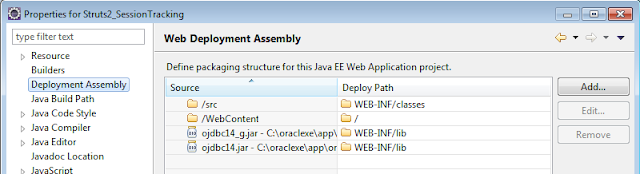
Deployment Assembly
Download Oracle JDBC jars

Create a Database Table and make two rows entry in it as shown below:
Login to oracle database and create table using GUI
Register Table
Register Table Data
login.jsp
create a user Login page.
 <%@ page language="java" contentType="text/html; charset=ISO-8859-1"  
      pageEncoding="ISO-8859-1"%>  
 <!DOCTYPE html PUBLIC "-//W3C//DTD HTML 4.01 Transitional//EN" "http://www.w3.org/TR/html4/loose.dtd">  
 <html>  
 <head>  
 <meta http-equiv="Content-Type" content="text/html; charset=ISO-8859-1">  
 <title>welcome page</title>  
 </head >  
 <body>  
 <h4 align=right><a href=login>Login</a></h4>  
     <h5 align=right><a href=login.jsp>Home</a>&nbsp&nbsp  
     <a href=#>FeedBack</a>&nbsp&nbsp  
     <a href=#>Contact Us</a></h5><hr>  
 <center><h1>Login</h1>  
 <form action="login">  
           <table>  
                <tr>  
                     <td>UserName</td>  
                     <td><input type="text" name="uname" /></td>  
                </tr>  
                <tr>  
                     <td>Password</td>  
                     <td><input type="password" name="upass" /></td>  
                </tr>  
                </table>  
           <input type="submit" value="Login" /><br/>  
           </form></center>  
 </body>  
 </html>  

struts.xml
 <?xml version="1.0" encoding="UTF-8"?>  
 <!DOCTYPE struts PUBLIC  
   "-//Apache Software Foundation//DTD Struts Configuration 2.0//EN"  
   "http://struts.apache.org/dtds/struts-2.0.dtd">  
   <struts>  
   <package name="log" namespace="/" extends="struts-default">  
   <action name="login" class="in.blog.webideaworld.LoginAction" method="execute">  
   <result name="success">/user.jsp</result>  
   <result name="error">/login.jsp</result>  
   </action>  
   <action name="logout" class="in.blog.webideaworld.Logout" method="logout">  
   <result name="success">/login.jsp</result>  
   </action>  
   <action name="profile" class="in.blog.webideaworld.Profiledirect" method="execute">  
   <result name="success">/profile.jsp</result>  
   </action>  
   <action name="profile1" class="in.blog.webideaworld.Profiledirect" method="execute">  
   <result name="success">/update.jsp</result>  
   </action>  
   <action name="home" class="in.blog.webideaworld.Profiledirect" method="execute">  
   <result name="success">/user.jsp</result>  
   </action>  
   <action name="update" class="in.blog.webideaworld.UpdateProfile" method="execute">  
   <result name="success">/success.jsp</result>  
   </action>  
   </package>  
   </struts>  


web.xml
 <?xml version="1.0" encoding="UTF-8"?>  
 <web-app xmlns:xsi="http://www.w3.org/2001/XMLSchema-instance" xmlns="http://java.sun.com/xml/ns/javaee" xmlns:web="http://java.sun.com/xml/ns/javaee/web-app_2_5.xsd" xsi:schemaLocation="http://java.sun.com/xml/ns/javaee http://java.sun.com/xml/ns/javaee/web-app_2_5.xsd" id="WebApp_ID" version="2.5">  
  <display-name>Struts2_SessionTracking</display-name>  
  <welcome-file-list>  
   <welcome-file>/login.jsp</welcome-file>  
    </welcome-file-list>  
    <filter>  
    <filter-name>struts2</filter-name>  
    <filter-class>  
      org.apache.struts2.dispatcher.ng.filter.StrutsPrepareAndExecuteFilter  
    </filter-class>  
   </filter>  
   <filter-mapping>  
    <filter-name>struts2</filter-name>  
    <url-pattern>/*</url-pattern>  
   </filter-mapping>  
 </web-app>  

DBconn.java
 package in.blog.webideaworld.dao;  
 import java.sql.Connection;  
 import java.sql.DriverManager;  
 import java.sql.Statement;  
 public class DBconn {  
      Statement st;  
      public Statement getSt()throws Exception {  
           Class.forName("oracle.jdbc.OracleDriver");  
            Connection conn=DriverManager.getConnection("jdbc:oracle:thin:@localhost:1521:XE","hr","hr");  
          st=conn.createStatement();  
          return st;  
      }  
 }  

LoginAction.java
create a Action java class for Login. SessionAware interface has a setSession(Map m) method which sets the Map of session attributes in the implementing class.
 package in.blog.webideaworld;  
 import java.sql.ResultSet;  
 import java.sql.Statement;  
 import java.util.Map;  
 import in.blog.webideaworld.dao.DBconn;  
 import org.apache.struts2.interceptor.SessionAware;  
 import com.opensymphony.xwork2.ActionSupport;  
 @SuppressWarnings("serial")  
 public class LoginAction extends ActionSupport implements SessionAware {  
      private String upass;  
      private String uname;  
      Map m;  
      public String getUpass() {  
           return upass;  
      }  
      public void setUpass(String upass) {  
           this.upass = upass;  
      }  
      public String getUname() {  
           return uname;  
      }  
      public void setUname(String uname) {  
           this.uname = uname;  
      }  
      public void setSession(Map m)  
      {  
           this.m=m;  
      }  
       public String execute() throws Exception{  
        try{  
            Statement st=new DBconn().getSt();  
            ResultSet rs=st.executeQuery("select * from register where uname='"+uname+"' and upass='"+upass+"'");  
            if(rs.next())  
            {    
                 m.put("id", rs.getInt(1));  
                 m.put("uname",rs.getString(2));  
                   m.put("upass", rs.getString(3));  
                 return SUCCESS;  
            }  
           }  
           catch (Exception e) {}  
          return ERROR;  
      }  
      }  

user.jsp
create a user welcome page.
 <%@page import="com.opensymphony.xwork2.ActionContext"%>  
 <%@page import="in.blog.webideaworld.LoginAction"%>  
 <%@page import="java.util.Map" %>  
 <%@ page language="java" contentType="text/html; charset=ISO-8859-1"  
   pageEncoding="ISO-8859-1" session="false"%>  
  <!DOCTYPE html PUBLIC "-//W3C//DTD HTML 4.01 Transitional//EN" "http://www.w3.org/TR/html4/loose.dtd">  
 <html>  
 <head>  
 <meta http-equiv="Content-Type" content="text/html; charset=ISO-8859-1">  
 <title>Valid page</title>  
 </head>  
 <body>  
 <h4 align=right><a href=logout.action>Logout</a></h4>  
    <h5><a href=profile.action>Profile</a>&nbsp&nbsp  
     <a href=#>FeedBack</a>&nbsp&nbsp  
     <a href=#>Contact Us</a></h5><hr>  
     <center>  
     <%   
 Map m=ActionContext.getContext().getSession();  
 String s1=(String)m.get("uname");  
 String s2=(String)m.get("upass");  
 if(s1==null && s2==null){  
   response.sendRedirect("notvalid.jsp");  
   }  
 %>   
 --------Welcome to WebIdeaWorld---------<br/>  
 Hello: <%=s1 %>  
 </center>  
 </body>  
 </html>  

notvalid.jsp
create a page for Person not Authorized.
 <%@ page language="java" contentType="text/html; charset=ISO-8859-1"  
   pageEncoding="ISO-8859-1"%>  
 <!DOCTYPE html PUBLIC "-//W3C//DTD HTML 4.01 Transitional//EN" "http://www.w3.org/TR/html4/loose.dtd">  
 <html>  
 <head>  
 <meta http-equiv="Content-Type" content="text/html; charset=ISO-8859-1">  
 <title>Not Valid User</title>  
 </head>  
 <body>  
 <h4 align=right><a href=login>Login</a></h4>  
     <h5 align=right><a href=login.jsp>Home</a>&nbsp&nbsp  
     <a href=#>FeedBack</a>&nbsp&nbsp  
     <a href=#>Contact Us</a></h5><hr>  
     <center>  
 You are not Authorized Person to this Website.</center>  
 </body>  
 </html>  

Profiledirect.java
create a setSession() method to make session object available to subsequent requests.Evey time when there is a request for session objects you need to pass it through setSession() method.
 package in.blog.webideaworld;  
 import java.util.Map;  
 import org.apache.struts2.interceptor.SessionAware;  
 import com.opensymphony.xwork2.ActionSupport;  
 public class Profiledirect extends ActionSupport implements SessionAware {  
      Map m;  
      public void setSession(Map m)  
      {  
           this.m=m;  
      }  
      public String execute() throws Exception{  
           return SUCCESS;  
      }  
 }  

profile.jsp
create a user's profile page.
 <%@page import="java.sql.*"%>  
 <%@page import="com.opensymphony.xwork2.ActionContext"%>  
 <%@page import="java.util.Map" %>  
 <%@page import="in.blog.webideaworld.dao.DBconn"%>  
 <%@ page language="java" contentType="text/html; charset=ISO-8859-1"  
   pageEncoding="ISO-8859-1" session="false"%>  
 <!DOCTYPE html PUBLIC "-//W3C//DTD HTML 4.01 Transitional//EN" "http://www.w3.org/TR/html4/loose.dtd">  
 <html>  
 <head>  
 <meta http-equiv="Content-Type" content="text/html; charset=ISO-8859-1">  
 <title>Profile</title>  
 </head>  
 <body>  
 <h4 align=right><a href=logout.action>Logout</a></h4>  
     <a href=home.action>Home</a>&nbsp&nbsp  
     <a href=profile.action>Profile</a>&nbsp&nbsp  
     <a href=#>FeedBack</a>&nbsp&nbsp  
     <a href=#>Contact Us</a></h5><hr>  
      <%        
          Map m=ActionContext.getContext().getSession();  
     String s1=(String)m.get("uname");  
     String s2=(String)m.get("upass");  
     if(s1==null && s2==null){  
     response.sendRedirect("notvalid.jsp");  
     }  
     try{  
     Statement st=new DBconn().getSt();  
     ResultSet rs=st.executeQuery("select * from register where uname='"+s1+"' and upass='"+s2+"'");  
           while(rs.next()) {  
                %>  
          <center>  
          <form action='profile1' method='post'>  
       <h1><%=rs.getString(4)%>'s Profile</h1>  
       <table><tr><td>UserName:</td><td><%=rs.getString(2)%></td></tr>  
       <tr><td>Password:</td><td><%=rs.getString(3) %></td></tr>  
       <tr><td>First Name:</td><td><%=rs.getString(4) %></td></tr>  
       <tr><td> Last Name:</td><td><%=rs.getString(5) %></td></tr>  
       </table><br/><input type='Submit' value='update'><br></form>  
       </center>  
       <%}  
     }  
     catch(Exception e){}  
       %>  
 </body>  
 </html>  

update.jsp
create a user's profile update page.
 <%@page import="java.sql.*"%>  
 <%@page import="com.opensymphony.xwork2.ActionContext"%>  
 <%@page import="java.util.Map" %>  
 <%@page import="in.blog.webideaworld.dao.DBconn"%>  
 <%@ page language="java" contentType="text/html; charset=ISO-8859-1"  
   pageEncoding="ISO-8859-1" session="false"%>  
 <!DOCTYPE html PUBLIC "-//W3C//DTD HTML 4.01 Transitional//EN" "http://www.w3.org/TR/html4/loose.dtd">  
 <html>  
 <head>  
 <meta http-equiv="Content-Type" content="text/html; charset=ISO-8859-1">  
 <title>Update Profile</title>  
 </head>  
 <body>  
 <h4 align=right><a href=logout.action>Logout</a></h4>  
     <a href=profile.action>Profile</a>&nbsp&nbsp  
     <a href=#>FeedBack</a>&nbsp&nbsp  
     <a href=#>Contact Us</a></h5><hr>  
     <%      
     Map m=ActionContext.getContext().getSession();  
      String s1=(String)m.get("uname");  
      String s2=(String)m.get("upass");  
      if(s1==null && s2==null){  
        response.sendRedirect("notvalid.jsp");  
        }  
     try  
     {  
       Statement st=new DBconn().getSt();  
       ResultSet rs=st.executeQuery("select * from register where uname='"+s1+"' and upass='"+s2+"'");  
       while(rs.next())  
       {out.println("<center><h1>"+rs.getString(4)+"'s Profile</h1></center>");%>  
     <center>  
     <form action="update" method="post">  
       <h1>Update your Profile</h1>  
       <table><tr><td>UserName:</td><td><input type="text" name="t1" value="<%=rs.getString(2)%>" ></td></tr>  
       <tr><td>Password:</td><td><input type="text" name="t2" value="<%=rs.getString(3)%>" ></td></tr>  
       <tr><td>Re-Type Password:</td><td><input type="text" value="<%=rs.getString(3)%>"></td></tr>  
       <tr><td>First Name:</td><td><input type="text" name="t3" value="<%=rs.getString(4)%>" ></td></tr>  
       <tr><td> Last Name:</td><td><input type="text" name="t4" value="<%=rs.getString(5)%>" ></td></tr>  
       </table>  
       *all fields are mandatory!<br>  
       <input type="Submit" value="Update" ><br>  
     </form>  
     </center>  
     <%  
        }  
     }  
     catch(Exception e){}  
 %>  
 </body>  
 </html>  

UpdateProfile.java
 package in.blog.webideaworld;  
 import java.sql.Statement;  
 import java.util.Map;  
 import in.blog.webideaworld.dao.DBconn;  
 import org.apache.struts2.interceptor.SessionAware;  
 import com.opensymphony.xwork2.ActionSupport;  
 public class UpdateProfile extends ActionSupport implements SessionAware {  
      private String t1;  
      private String t2;  
      private String t3;  
      private String t4;  
      Map m;  
      public void setSession(Map m)  
      {  
           this.m=m;  
      }  
   public String getT1() {  
           return t1;  
      }  
      public void setT1(String t1) {  
           this.t1 = t1;  
      }  
      public String getT2() {  
           return t2;  
      }  
      public void setT2(String t2) {  
           this.t2 = t2;  
      }  
      public String getT3() {  
           return t3;  
      }  
      public void setT3(String t3) {  
           this.t3 = t3;  
      }  
      public String getT4() {  
           return t4;  
      }  
      public void setT4(String t4) {  
           this.t4 = t4;  
      }  
 public String execute() throws Exception{  
           try{  
               int s1=(Integer)m.get("id");  
                  Statement st=new DBconn().getSt();  
            int i=st.executeUpdate("update register set uname='"+t1+"',upass='"+t2+"',fname='"+t3+"',lname='"+t4+"'"  
                               +"where id="+s1+"");  
            if(i!=0)  
            {  
                 m.put("uname", t1);  
                 m.put("upass", t2);  
                 return SUCCESS;  
            }  
           }  
           catch (Exception e) {}  
          return ERROR;  
      }  
 }  

success.jsp
create a user's profile successfully updated page.
 <%@ page language="java" contentType="text/html; charset=ISO-8859-1"  
   pageEncoding="ISO-8859-1"%>  
 <!DOCTYPE html PUBLIC "-//W3C//DTD HTML 4.01 Transitional//EN" "http://www.w3.org/TR/html4/loose.dtd">  
 <html>  
 <head>  
 <meta http-equiv="Content-Type" content="text/html; charset=ISO-8859-1">  
 <title>Success</title>  
 </head>  
 <body>  
 <h4 align=right><a href=logout.action>Logout</a></h4>  
     <a href=profile.action>Profile</a>&nbsp&nbsp  
     <a href=#>FeedBack</a>&nbsp&nbsp  
     <a href=#>Contact Us</a></h5><hr>  
     <center>  
 Your Profile's record(s) updated successfully.</center>  
 </body>  
 </html>  

Logout.java
 package in.blog.webideaworld;  
 import java.util.Map;  
 import com.opensymphony.xwork2.ActionContext;  
 import com.opensymphony.xwork2.ActionSupport;  
 public class Logout extends ActionSupport{  
      public String logout() throws Exception{  
           Map session=ActionContext.getContext().getSession();  
           session.remove("id");  
           session.remove("uname");  
           session.remove("upass");  
           return SUCCESS;  
      }  
 }  

Download Code

View in Browser: 

Login Screen


Welcome Page


User's Profile


User's Profile Update Page

 
User's Profile After Update

Monday, December 24, 2012

Session Tracking using HttpSession Interface


To recognize particular user we create a session and bind that user with that session object. For every new user, program creates a new session and the same thing we are doing here we are creating a session during user login. If user exists in the database then page will redirect to valid page and a session will generate else it'll redirect to Invalid page.

If you copy valid page url to another browser then it'll redirect it to index.jsp page because we are checking whether session is null or not.

public HttpSession getSession(boolean create)
Returns the current HttpSession associated with this request or, if there is no current session and create is true, returns a new session.
If create is false and the request has no valid HttpSession, this method returns null.

On Valid.java page our create is false and if we try to go to this page directly then null will redirect it to index.jsp page.
 
Project View After Completion
Create login table and insert data into login table using insert command and here we are using Oracle10g database(you can also use other database)
 create table login ( id number,  
 uname varchar2(20),  
 upass varchar2(20)  
 );  


 insert into login values (1,'him','him123');  
 commit;  

HttpSession Interface and Methods  :

public interface HttpSession
Provides a way to identify a user across more than one page request or visit to a Web site and to store information about that user. 


public HttpSession getSession()
Returns the current session associated with this request, or if the request does not have a session, creates one. 


public void setAttribute(String name, Object value)
Binds an object to this session, using the name specified. If an object of the same name is already bound to the session, the object is replaced.


public Object getAttribute(String name)
Returns the object bound with the specified name in this session, or null if no object is bound under the name. 


HttpSession Example: 

index.jsp
This is page for user's view  and on submit action is run1

 <html>  
  <head>  
   <title></title>  
   <meta http-equiv="Content-Type" content="text/html; charset=UTF-8">  
  </head>  
  <body>  
    <center>  
    <h1>Application Form</h1>  
    <form action="run1" method="get">  
      <table>  
        <tr>  
          <td>User Name : </td>  
          <td><input type="text" name="t1"></td>  
        </tr>  
        <tr>  
          <td>Password : </td>  
          <td><input type="password" name="t2"></td>  
        </tr>  
        <tr>  
          <td>  
            <input type="submit" value="Sign In"/>  
          </td>  
        </tr>  
      </table>  
    </form>  
  </center>  
  </body>  
 </html>  


web.xml
 <?xml version="1.0" encoding="UTF-8"?>  
 <web-app version="2.5" xmlns="http://java.sun.com/xml/ns/javaee" xmlns:xsi="http://www.w3.org/2001/XMLSchema-instance" xsi:schemaLocation="http://java.sun.com/xml/ns/javaee http://java.sun.com/xml/ns/javaee/web-app_2_5.xsd">  
   <servlet>  
     <servlet-name>LoginServlet</servlet-name>  
     <servlet-class>LoginServlet</servlet-class>  
   </servlet>  
   <servlet>  
     <servlet-name>Invalid</servlet-name>  
     <servlet-class>Invalid</servlet-class>  
   </servlet>  
   <servlet>  
     <servlet-name>Valid</servlet-name>  
     <servlet-class>Valid</servlet-class>  
   </servlet>  
   <servlet-mapping>  
     <servlet-name>LoginServlet</servlet-name>  
     <url-pattern>/run1</url-pattern>  
   </servlet-mapping>  
   <servlet-mapping>  
     <servlet-name>Invalid</servlet-name>  
     <url-pattern>/Invalid</url-pattern>  
   </servlet-mapping>  
   <servlet-mapping>  
     <servlet-name>Valid</servlet-name>  
     <url-pattern>/Valid</url-pattern>  
   </servlet-mapping>  
   <session-config>  
     <session-timeout>  
       30  
     </session-timeout>  
   </session-config>  
   <welcome-file-list>  
     <welcome-file>index.jsp</welcome-file>  
   </welcome-file-list>  
 </web-app>  

LoginServlet.java
 import java.io.IOException;  
 import java.io.PrintWriter;  
 import javax.servlet.ServletException;  
 import javax.servlet.http.*;  
 import java.sql.*;  
 public class LoginServlet extends HttpServlet {  
   protected void service(HttpServletRequest req, HttpServletResponse resp) throws ServletException, IOException {  
     resp.setContentType("text/html");  
     PrintWriter out=resp.getWriter();  
     String s1=req.getParameter("t1");  
     String s2=req.getParameter("t2");  
     try  
     {  
       Class.forName("oracle.jdbc.driver.OracleDriver");  
       Connection con=DriverManager.getConnection("jdbc:oracle:thin:@localhost:1521:xe","hr","hr");  
       Statement st=con.createStatement();  
       ResultSet rs=st.executeQuery("select * from login where uname='"+s1+"' and upass='"+s2+"'");  
       if(rs.next())  
       {  
         HttpSession session=req.getSession();  
         session.setAttribute("user", s1);  
         resp.sendRedirect("Valid");  
       }  
        else  
       {  
         resp.sendRedirect("Invalid");  
        }  
     }  
     catch(Exception e)  
     {  
       out.println(e);  
     }  
   }  
  }  

Valid.java
 import java.io.IOException;  
 import java.io.PrintWriter;  
 import javax.servlet.ServletException;  
 import javax.servlet.http.*;  
 public class Valid extends HttpServlet {  
   protected void service(HttpServletRequest request, HttpServletResponse response)  
   throws ServletException, IOException {  
     response.setContentType("text/html;charset=UTF-8");  
     PrintWriter out = response.getWriter();  
     HttpSession session=request.getSession(false);  
     if(session==null)  
     {  
       response.sendRedirect("index.jsp");  
      }  
  else  
     {  
       String name=(String)session.getAttribute("user");  
       out.println("<h1>Welcome!"+ name +"</h1>");  
      }  
    }   
 }  

Invalid.java
 import java.io.IOException;  
 import java.io.PrintWriter;  
 import javax.servlet.ServletException;  
 import javax.servlet.http.HttpServlet;  
 import javax.servlet.http.HttpServletRequest;  
 import javax.servlet.http.HttpServletResponse;  
 public class Invalid extends HttpServlet {  
   protected void service(HttpServletRequest request, HttpServletResponse response)  
   throws ServletException, IOException {  
     response.setContentType("text/html;charset=UTF-8");  
     PrintWriter out = response.getWriter();  
       out.println("<html>");  
       out.println("<head>");  
       out.println("<title>Servlet Invalid</title>");  
       out.println("</head>");  
       out.println("<body>");  
       out.println("<h1>Invalid User!</h1>");  
       out.println("</body>");  
       out.println("</html>");  
     }  
 }  

Download Code Link 1
Download Code Link 2

Output:

Friday, December 21, 2012

Session Tracking using Cookies


Http is a stateless protocol so that it can't maintain user's state or can't recognize that request is coming from same user to server so that to maintain user's state we are using Session Tracking with the help of Cookie Class.

Project View After Completion


Create login table and insert data into login table using insert command and here we are using Oracle10g database(you can also use other database)
 create table login ( id number,  
 uname varchar2(20),  
 upass varchar2(20)  
 );  


 insert into login values (1,'him','him123');  
 commit;  

Cookie Class and Methods

public class Cookie extends Object implements Cloneable
Creates a cookie, a small amount of information sent by a servlet to a Web browser, saved by the browser, and later sent back to the server. A cookie's value can uniquely identify a client, so cookies are commonly used for session management.


public Cookie(String name, String value)
Constructs a cookie with the specified name and value. 

public void addCookie(Cookie cookie)
Adds the specified cookie to the response. This method can be called multiple times to set more than one cookie.


public Cookie[] getCookies()

Returns an array containing all of the Cookie objects the client sent with this request. This method returns null if no cookies were sent. 

public String getName()
Returns the name of the cookie. The name cannot be changed after creation. 


public String getValue()
Gets the current value of this Cookie. 


public int getMaxAge()
Gets the maximum age in seconds of this Cookie.
By default, -1 is returned, which indicates that the cookie will persist until browser shutdown.


public void setMaxAge(int expiry)
Sets the maximum age in seconds for this Cookie. 

Cookie Example:

index.jsp
This is page for user's view  and on submit action is run1
 <html>  
  <head>  
   <title></title>  
   <meta http-equiv="Content-Type" content="text/html; charset=UTF-8">  
  </head>  
  <body><center>  
    <h1>Application Form</h1>  
    <form action="run1" method="get">  
      <table>  
        <tr>  
          <td>User Name : </td>  
          <td><input type="text" name="t1"></td>  
        </tr>  
        <tr>  
          <td>Password : </td>  
          <td><input type="password" name="t2"></td>  
        </tr>  
        <tr>  
          <td>  
            <input type="submit" value="Sign In"/>  
          </td>  
        </tr>  
      </table>  
    </form>  
    </center></body>  
 </html>  

web.xml
 <?xml version="1.0" encoding="UTF-8"?>  
 <web-app version="2.5" xmlns="http://java.sun.com/xml/ns/javaee" xmlns:xsi="http://www.w3.org/2001/XMLSchema-instance" xsi:schemaLocation="http://java.sun.com/xml/ns/javaee http://java.sun.com/xml/ns/javaee/web-app_2_5.xsd">  
   <servlet>  
     <servlet-name>LoginServlet</servlet-name>  
     <servlet-class>LoginServlet</servlet-class>  
   </servlet>  
   <servlet>  
     <servlet-name>Invalid</servlet-name>  
     <servlet-class>Invalid</servlet-class>  
   </servlet>  
   <servlet>  
     <servlet-name>Valid</servlet-name>  
     <servlet-class>Valid</servlet-class>  
   </servlet>  
   <servlet-mapping>  
     <servlet-name>LoginServlet</servlet-name>  
     <url-pattern>/run1</url-pattern>  
   </servlet-mapping>  
   <servlet-mapping>  
     <servlet-name>Invalid</servlet-name>  
     <url-pattern>/Invalid</url-pattern>  
   </servlet-mapping>  
   <servlet-mapping>  
     <servlet-name>Valid</servlet-name>  
     <url-pattern>/Valid</url-pattern>  
   </servlet-mapping>  
   <session-config>  
     <session-timeout>  
       30  
     </session-timeout>  
   </session-config>  
   <welcome-file-list>  
     <welcome-file>index.jsp</welcome-file>  
   </welcome-file-list>  
 </web-app>  

LoginServlet.java
 import java.io.IOException;  
 import java.io.PrintWriter;  
 import javax.servlet.ServletException;  
 import javax.servlet.http.*;  
 import java.sql.*;  
 public class LoginServlet extends HttpServlet {  
   @Override  
   protected void service(HttpServletRequest req, HttpServletResponse resp) throws ServletException, IOException {  
     resp.setContentType("text/html");  
     PrintWriter out=resp.getWriter();  
     String s1=req.getParameter("t1");  
     String s2=req.getParameter("t2");  
     try  
     {  
       Class.forName("oracle.jdbc.driver.OracleDriver");  
       Connection con=DriverManager.getConnection("jdbc:oracle:thin:@localhost:1521:xe","hr","hr");  
       Statement st=con.createStatement();  
       ResultSet rs=st.executeQuery("select * from login where uname='"+s1+"' and upass='"+s2+"'");  
       if(rs.next())  
       {  
         Cookie c=new Cookie("name",s1);  
         resp.addCookie(c);  
         resp.sendRedirect("Valid");  
       }  
  else  
       {  
         resp.sendRedirect("Invalid");  
        }  
     }  
     catch(Exception e)  
     {  
       out.println(e);  
     }  
   }  
  }  

Valid.java
 import java.io.IOException;  
 import java.io.PrintWriter;  
 import javax.servlet.ServletException;  
 import javax.servlet.http.*;  
 public class Valid extends HttpServlet {  
   protected void service(HttpServletRequest request, HttpServletResponse response)  
   throws ServletException, IOException {  
     response.setContentType("text/html;charset=UTF-8");  
     PrintWriter out = response.getWriter();  
     try {  
       Cookie c[]=request.getCookies();  
       if(c==null)  
       {  
         response.sendRedirect("index.jsp");  
       }  
  else  
       {  
         out.println("<h1>Welcome!"+c[0].getValue()+"</h1>");  
  }  
     } finally {   
       out.close();  
     }  
   }   
 }  

Invalid.java
 import java.io.IOException;  
 import java.io.PrintWriter;  
 import javax.servlet.ServletException;  
 import javax.servlet.http.HttpServlet;  
 import javax.servlet.http.HttpServletRequest;  
 import javax.servlet.http.HttpServletResponse;  
 public class Invalid extends HttpServlet {  
   protected void service(HttpServletRequest request, HttpServletResponse response)  
   throws ServletException, IOException {  
     response.setContentType("text/html;charset=UTF-8");  
     PrintWriter out = response.getWriter();  
     try {  
       out.println("<html>");  
       out.println("<head>");  
       out.println("<title>Servlet Invalid</title>");   
       out.println("</head>");  
       out.println("<body>");  
       out.println("<h1>Invalid User!</h1>");  
       out.println("</body>");  
       out.println("</html>");  
     } finally {   
       out.close();  
     }  
   }   
 }  

Download Code Link 1
Download Code Link 2
Output:

Thursday, December 20, 2012

RequestDispatcher Interface and SendRedirect() Method


RequestDispatcher Interface 

public interface RequestDispatcher
 
Defines an object that receives requests from the client and sends them to any resource (such as a servlet, HTML file, or JSP file) on the server. 


public RequestDispatcher getRequestDispatcher(String path)
 
Returns a RequestDispatcher object that acts as a wrapper for the resource located at the given path. A RequestDispatcher object can be used to forward a request to the resource or to include the resource in a response. The resource can be dynamic or static. 
  
public void include(ServletRequest request, ServletResponse response) throws ServletException, IOException
 
Includes the content of a resource (servlet, JSP page, HTML file) in the response. In essence, this method enables programmatic server-side includes. 

login.java
 ResultSet rs=st.executeQuery("select * from login where Uname='"+s1+"'and Upass='"+s2+"'");  
    if(rs.next())  
        {  
         RequestDispatcher rd=request.getRequestDispatcher("validUser");  
         rd.include(request, response);  
       }  
    else  
     {  
         out.print("invalid user");  
      RequestDispatcher rd=request.getRequestDispatcher("Register.jsp");  
     rd.include(request, response);  
    }  


SendRedirect() Method

public void sendRedirect(String location) throws IOException

Sends a temporary redirect response to the client using the specified redirect location URL and clears the buffer.

login.java
 ResultSet rs=st.executeQuery("select * from login where Uname='"+s1+"'and Upass='"+s2+"'");  
    if(rs.next())  
        {  
         response.sendRedirect("validUser");  
       }  
    else  
     {  
         out.print("invalid user");  
         response.sendRedirect("Register.jsp");
    }  

web.xml
  <?xml version="1.0" encoding="UTF-8"?>  
   <servlet>  
     <servlet-name>login</servlet-name>  
     <servlet-class>login</servlet-class>  
   </servlet>    
   <servlet>  
     <servlet-name>validUser</servlet-name>  
     <servlet-class>validUser</servlet-class>  
   </servlet>  
   <servlet-mapping>  
     <servlet-name>login</servlet-name>  
     <url-pattern>/login</url-pattern>  
   </servlet-mapping>  
   <servlet-mapping>  
     <servlet-name>validUser</servlet-name>  
     <url-pattern>/validUser</url-pattern>  
   </servlet-mapping>  
   <session-config>  
     <session-timeout>  
       30  
     </session-timeout>  
   </session-config>  
   <welcome-file-list>  
     <welcome-file>index.jsp</welcome-file>  
   </welcome-file-list>  
 </web-app>  


Download Code Link 1
Download Code Link 2

Monday, December 10, 2012

Login Using Struts2 and Eclipse


In this Tutorial we are performing login using equals() method.
Project View After Completion


login.jsp
This is page for user's input and here we using struts tags and on submit action is login.
 <%@ page language="java" contentType="text/html; charset=ISO-8859-1"  
   pageEncoding="ISO-8859-1"%>  
 <%@ taglib prefix="s" uri="/struts-tags" %>  
 <!DOCTYPE html PUBLIC "-//W3C//DTD HTML 4.01 Transitional//EN" "http://www.w3.org/TR/html4/loose.dtd">  
 <html>  
 <head>  
 <meta http-equiv="Content-Type" content="text/html; charset=ISO-8859-1">  
 <title>Login page</title>  
 </head>  
 <body>  
 <h1>Login</h1>  
 <s:form action="login">  
 <s:textfield label="User Name:" name="uname"/>  
 <s:password label="Password:" name="upass"/>  
 <s:submit value="Login"/>  
 </s:form>  
 </body>  
 </html>  

struts.xml
This file contains information about which action class to be invoked. here we are invoking LoginAction class using action name login present in index.jsp's page form tag on submit button click.
 <?xml version="1.0" encoding="UTF-8"?>  
 <!DOCTYPE struts PUBLIC  
   "-//Apache Software Foundation//DTD Struts Configuration 2.0//EN"  
   "http://struts.apache.org/dtds/struts-2.0.dtd">  
   <struts>  
   <package name="log" namespace="/" extends="struts-default">  
   <action name="login" class="com.webideaworld.blog.LoginAction" method="execute">  
   <result name="success">/user.jsp</result>  
   <result name="error">/login.jsp</result>  
   </action>  
   </package>  
   </struts>  

web.xml
This file is providing Configuration and deployment information.
 <?xml version="1.0" encoding="UTF-8"?>  
 <web-app xmlns:xsi="http://www.w3.org/2001/XMLSchema-instance" xmlns="http://java.sun.com/xml/ns/javaee" xmlns:web="http://java.sun.com/xml/ns/javaee/web-app_2_5.xsd" xsi:schemaLocation="http://java.sun.com/xml/ns/javaee http://java.sun.com/xml/ns/javaee/web-app_2_5.xsd" id="WebApp_ID" version="2.5">  
  <display-name>ProjLogin</display-name>  
  <welcome-file-list>  
   <welcome-file>login.jsp</welcome-file>  
    </welcome-file-list>  
    <filter>  
    <filter-name>struts2</filter-name>  
    <filter-class>  
      org.apache.struts2.dispatcher.FilterDispatcher  
    </filter-class>  
   </filter>  
   <filter-mapping>  
    <filter-name>struts2</filter-name>  
    <url-pattern>/*</url-pattern>  
   </filter-mapping>  
 </web-app>  

LoginAction.java
This is a POJO class and it is working as action class for Struts.
 package com.webideaworld.blog;  
 import com.opensymphony.xwork2.Action;  
 public class LoginAction implements Action {  
      private String uname;  
      private String upass;       
      public String execute() throws Exception {  
           if (getUname().equals("him") && getUpass().equals("pass123")) {  
                return SUCCESS;  
           }  
           else {  
                return ERROR;       
           }  
      }  
      public String getUname() {  
           return uname;  
      }  
      public void setUname(String uname) {  
           this.uname = uname;  
      }  
      public String getUpass() {  
           return upass;  
      }  
      public void setUpass(String upass) {  
           this.upass = upass;  
      }  
 }  

user.jsp
This is a success page that displays hello with user name.
 <%@ page language="java" contentType="text/html; charset=ISO-8859-1"  
   pageEncoding="ISO-8859-1"%>  
   <%@ taglib prefix="s" uri="/struts-tags" %>  
 <!DOCTYPE html PUBLIC "-//W3C//DTD HTML 4.01 Transitional//EN" "http://www.w3.org/TR/html4/loose.dtd">  
 <html>  
 <head>  
 <meta http-equiv="Content-Type" content="text/html; charset=ISO-8859-1">  
 <title>Insert title here</title>  
 </head>  
 <body>  
 hello <s:property value="uname"/>  
 </body>  
 </html>  

Output:
Login Page:
Success Page:

Popular Posts